Help people choose a class and reach the right next step
A learner can compare class choices and reach a clearly explained campus handoff. The review also needs to account for entry conditions, sponsored learners, location choices and what happens when a class is unavailable.
Status: expert review in progress, October 26, 2026. This is the main prototype findings record. The journey assessment connects checked routes to learner goals. The journey-map handoff preserves all 57 steps, saved images and open questions. Screenshot comments provide short feedback at precise places.
What the scenario assessment establishes
The assessment covers known-offering entry, exploring patient-care options, learning Spanish for personal value, and asking for help before commitment. It compares actual schedules, learning contexts, costs and outcome wording. It also distinguishes clear answers from information that is present but insufficient to decide.
The shared priority is to make attendance, cost, outcome and the next action understandable through results, details and handoff. New checks add delivery clarity (F-029), meeting facts during comparison (F-030), level/outcomes for personal learning (F-031), and course-specific help (F-032). Full employer administration remains outside the agreed review.
This is an expert assessment supported by research, requirements and observed states. It does not measure learner comprehension or task success. The priority order below is a design judgment with unknown audience reach, not a quantified ranking. Route/data answers remain conditions for final design choices.
What to address first
Content Strategy
The homepage makes broad promises about course length, entry, credit and aid. Check each claim against SUNY's rules. On course pages, help people see who can join, what they will learn or earn, the full cost and when payment is due. Two checked courses put payment before registration closes; the team needs to settle what that means. Homepage wording; entry conditions; cost and deadlines.
Structure
Search, course-type and campus links give people a start. Add a way in for someone who knows their goal but not a course name, and make help work when search has no answer. Show why one campus appears first and what other choices remain. The public site map can be agreed as the wider service takes shape. PruTech and SUNY also need to settle which courses use the cart and which send people to a campus. Starting points; navigation map; registration routes.
Design
Keep main actions consistent from search through checkout. Show the full course name, then put schedule, cost and outcome ahead of repeated images and long supporting text. Keep the aligned prices, which help people compare courses. Check long names and descriptions in other languages. Action styles; course facts; long descriptions.
Accessibility
On small phones, some pages run off the edge. Search hints and a closed-class message are too faint. On one course page, keyboard focus is hard to see and a link hides behind the header. Fix these issues, then check the rest of the journey. Small screens; field hints; keyboard.
Where it appears in the journey
- Hear about it: The homepage offers search, course-type links and a campus route. Its large campus directory and one-type featured shelf give less guidance to people browsing by goal. Incoming links from other sites were not checked.
- Search and browse: Type and online filters worked and stayed selected when returning from a course. Saving a preferred campus put its courses first while retaining all 801 displayed results. Declining device location offered ZIP entry. Cards make meeting times harder to compare, and empty-search help did not respond in the checked state. Other sort orders and the distance calculation remain unchecked.
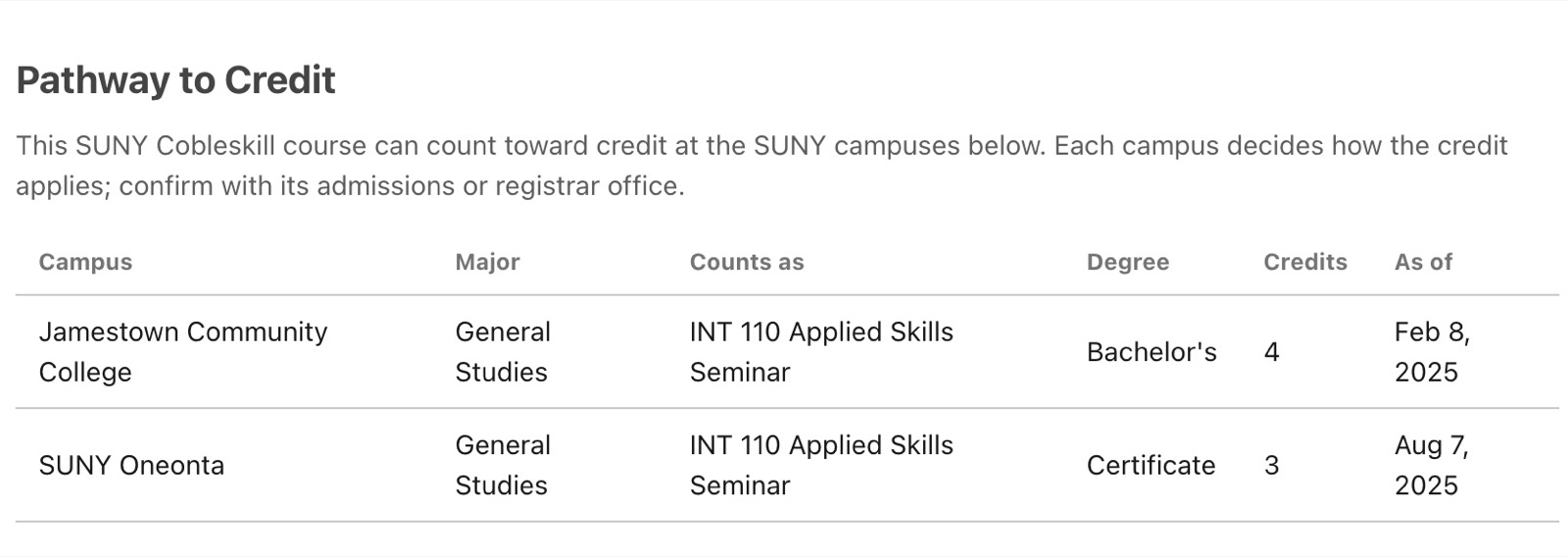
- Look at a course: Pages show the campus, dates, price and some entry facts. Hybrid attendance, starting level, eligibility, awarding authority, funding terms and cost details need clearer explanations. One microcredential page was sampled; a parent program with child offerings was not. The Cobleskill credit-pathway table and Potsdam funding conditions are useful examples to keep.
- Pick when to take it: The workshop explains that its classes cover the same material and updates the summary when a class changes. Payment dates precede registration deadlines on the checked workshop and Potsdam Spanish course. A group-size field opens on Potsdam; its seat-check behavior was not tested. One closed section was seen, but a full section, waitlist and Coming Soon route were not.
- Next step: The workshop adds a class to a cart; two healthcare pages explain a handoff to campus registration. A fresh direct link opened one Spanish course with its campus and next action. Spanish Register was not pressed. A sponsored learner's own route, two courses for one person, account, payment and confirmation steps were not reviewed.
- Ask a question: A general Contact SUNY link appears in the footer. Contact Us did not respond after an empty search, and some course pages lack a direct question route. Inquiry fields, course context, response routing and account requirements were not followed.
- Leave or come back: Filters remained selected on return from a course. Returning from a campus site, favorites and later follow-up were not checked.
The 57-step handoff holds the step-by-step observations, historical ratings, screenshots and open decisions. A past rating is not a new test result.
Findings
F-021: Make the outcome and funding labels understandable
Observed: the desktop catalog uses short badges such as “Cert” and “PTT.” Its accessibility text expands these to industry certification and part-time TAP eligibility. Health Care Assistant is labeled eight credits and places exam preparation under What you can earn. Catalog screen; detail text.
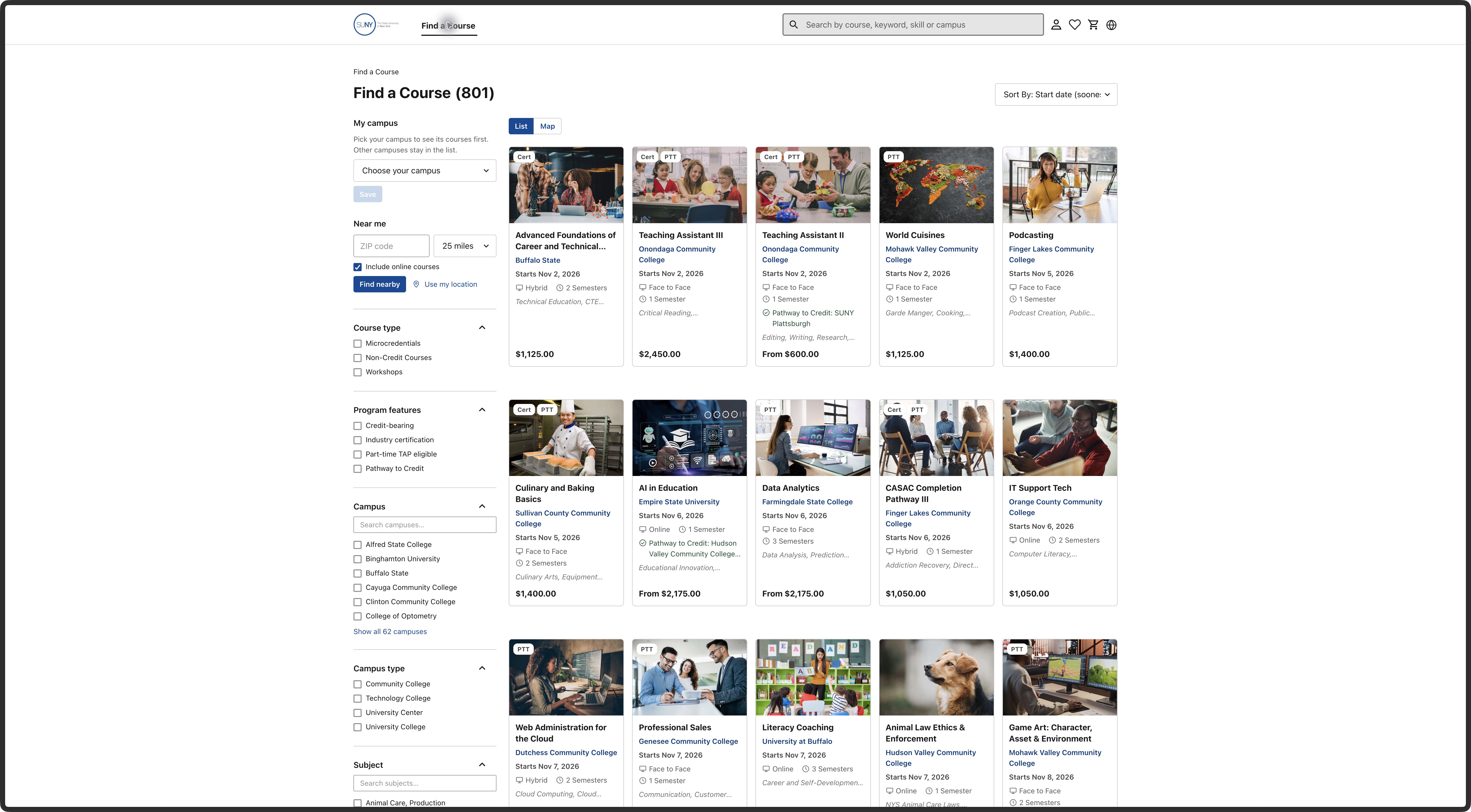
Consequence: a person exploring work or study could confuse a completion award, preparation for an exam, academic credit and possible aid. This is a comprehension risk, not an observed learner error. An eight-credit offering is not inherently incorrect in this prototype.
Change: name what completion awards and who awards it, explain any separate exam or approval, and spell out funding terms with their conditions. Verify each claim against its campus source. S03 story 10 asks for the recorded awarding authority. Supports N-002–003 and May's plain-language feedback. PruTech and the catalog/content owner should confirm sources; SUNY should confirm scope. Confidence: high for displayed wording, provisional for its effect. Check: ask relevant learners to explain the award, issuer and what remains conditional.
F-022: Keep career information specific to the offering
Observed: the four-hour Introduction to 3D Printing workshop lists IT Support Specialist, Help Desk Technician and Junior Developer, followed by general IT certification advice. Its stated learning content is consumer 3D printing and modeling software. Workshop screen; text.
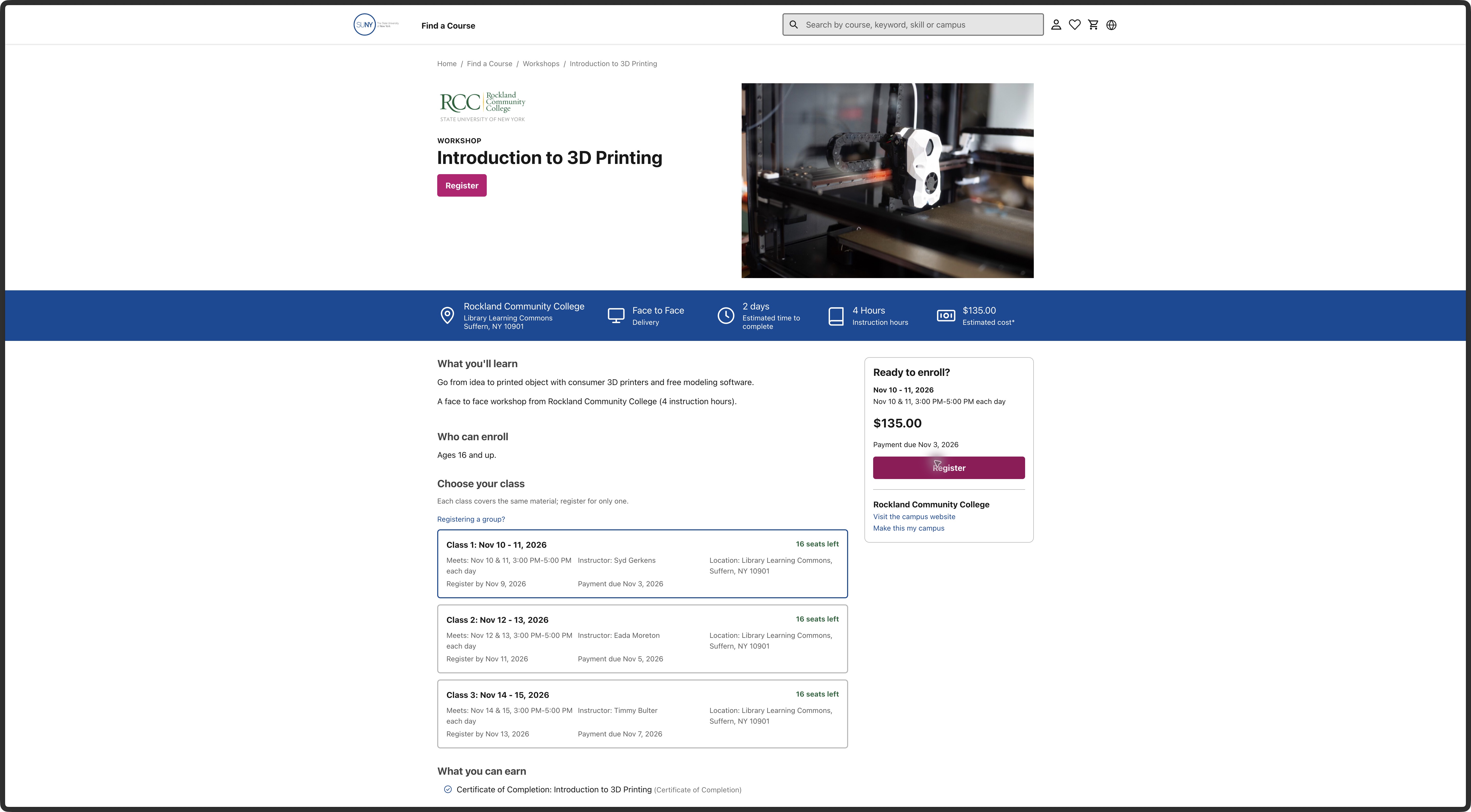
Consequence: someone choosing for work may infer a relationship that the page does not explain. N-003; exploring-change scenario. Change: have the campus content owner substantiate the relationship or replace the section with accurate, relevant information. PruTech should identify whether these fields are examples, imported records or approved content. The FRD allows display-only career content; it does not support invented outcomes. Confidence: high about the mismatch in topic, data origin unknown. Check: trace the field to its source and test what a learner believes the workshop prepares them to do.
F-023: Explain the amount due and how deadlines work
Observed: the workshop shows $135 estimated, with final costs confirmed by campus. Class 1 allows registration through November 9 but lists payment due November 3. Potsdam's Spanish course says register by November 19 and pay by November 13. The cart shows an estimated total with tax still to be determined. Class choices; Potsdam section; cart.

Consequence: a person checking affordability or registering near the deadline cannot tell from these states what extra costs may apply or how payment works after the listed payment date. N-001–002; known-offering and exploring scenarios. Change: show what the estimate includes, when the final amount is known and the approved late-registration rule. Campus finance/registration owners and PruTech must supply those rules. Confidence: high for displayed dates and amounts; no late-registration attempt was made. Check: a learner can state the amount known now, any remaining cost uncertainty and the next deadline without guessing.
F-024: Give an unanswered search a useful way forward
Observed: glassblowing returned zero results. Contact Us showed no visible navigation, dialog or response after a pointer click on the visible target and keyboard activation. Recheck screen; state.
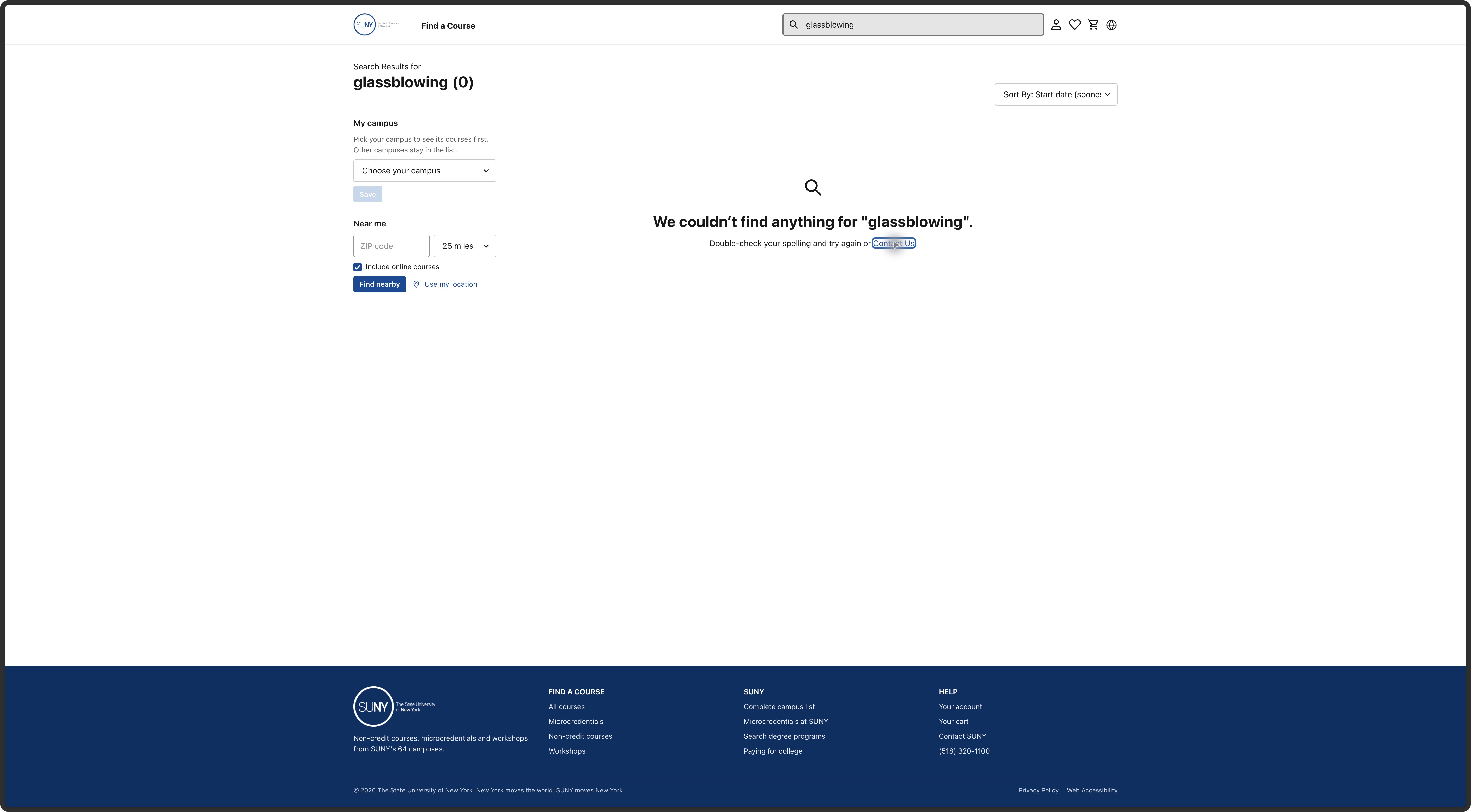
Consequence: a personal-interest visitor who needs help cannot use the offered recovery step in this checked state. N-005. Change: connect it to an approved public inquiry or contact route, carrying the search context where useful. PruTech owns the interaction; the support owner must confirm routing. May and the draft FRD both support asking before registration. Confidence: high for this observed state, implementation cause unknown. Check: follow the action to a clear destination without an account requirement or submitted inquiry, then test whether a learner can recover.
F-025: Agree and explain the two registration routes
Observed: the workshop's Register action adds its class to a cart. Health Care Assistant opens an explained campus-registration dialog. Both routes work to those boundaries. Cart handoff; campus handoff.
Consequence: the next step and responsible team differ by offering. N-004 and N-006; all review scenarios. This is a product-model question, not proof that an external route is a defect. May discussed shared registration and campus payment gateways; the newer draft describes authenticated registration and campus-grouped carts, while architecture choices remain open.
Decision for PruTech and SUNY: which offering types use each route, is that approved for release 1, and how are learner records and support handled after a campus handoff? Then use labels that describe the actual next step, such as adding a class or continuing to a named campus. Confidence: high about the two observed routes, intended model unresolved. Check: the route matches the approved rule and learners can explain what happens next and where to ask for help.
F-026: Make the cart's meaning clear for individual and group registration
Observed: the cart shows the selected class and price, plus quantity, gift and shipping controls. Cart screen; text.
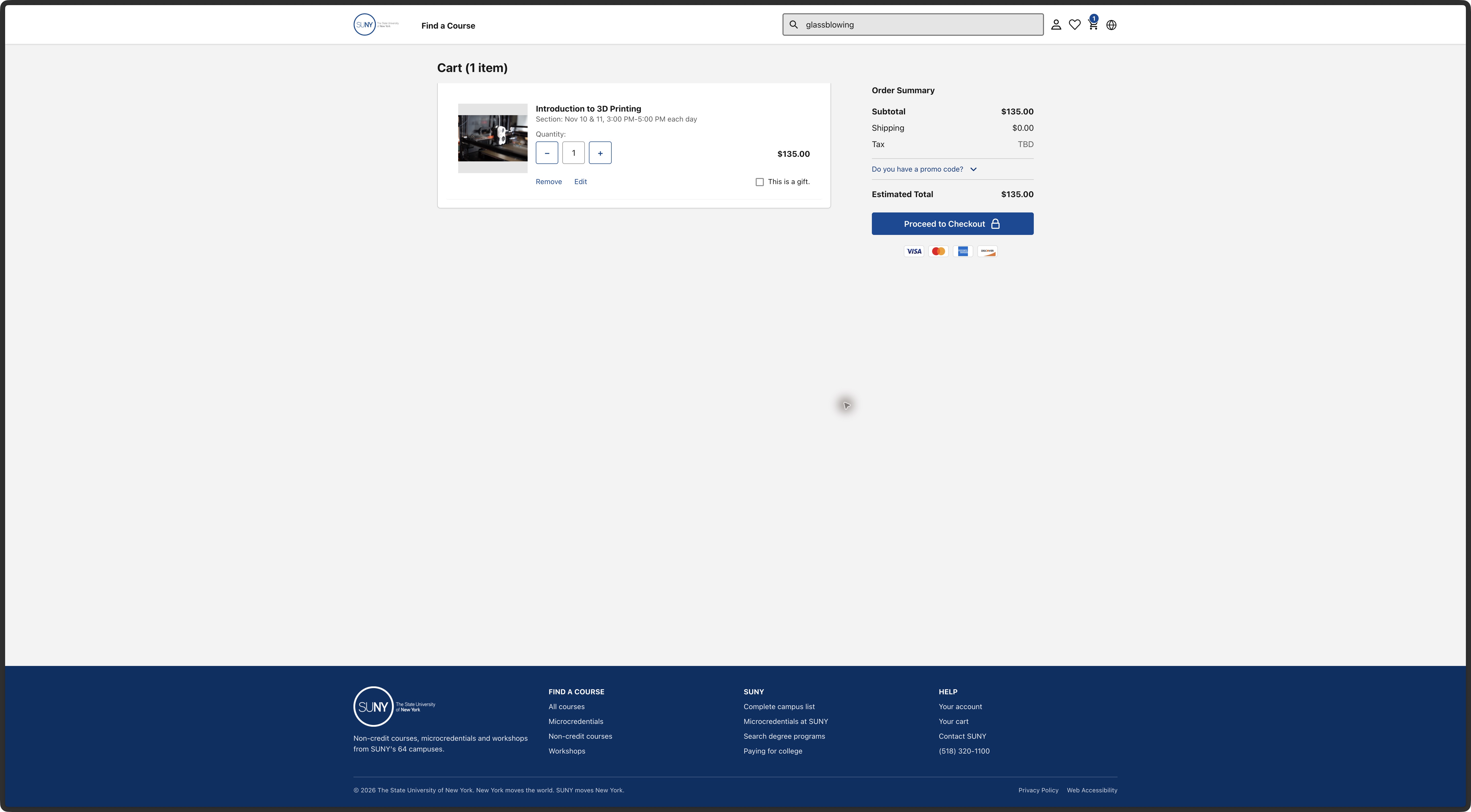
Consequence: an individual may be unsure whether quantity means seats, learners or purchases, and whether a gift has a supported registration process. May 21 raised a different question: one person taking two separate classes at the same campus, especially when seats fill quickly. That account came from one stakeholder, so its frequency is unknown. N-004 and N-006. May 21, 20:15–25:08. Change: retain the useful class summary; distinguish another seat in one class from another class for the same learner, and show only controls supported by the approved flow. Avoid promising a reserved seat until the hold rule is settled. Registration/finance owners should resolve both rules with PruTech. Confidence: high about visible controls, their intended purpose unknown. Check: an individual and a training organizer can explain who will be registered and what payment confirms. Do not test by making a real reservation.
F-027: Keep closed-registration information readable
Observed: the ‘Registration closed’ message on Health Care Assistant appears faint even though it carries useful availability information. Red text inside a faded container produces 3.02:1 contrast against white. The source text color is #EA001E, the container has 0.6 opacity, and the resulting color is approximately RGB 242.4/102/120. The message is 14 CSS pixels, bold. Its ancestors are plain containers, not disabled controls. Live styles, opacity chain and calculation, E-063; loaded page.
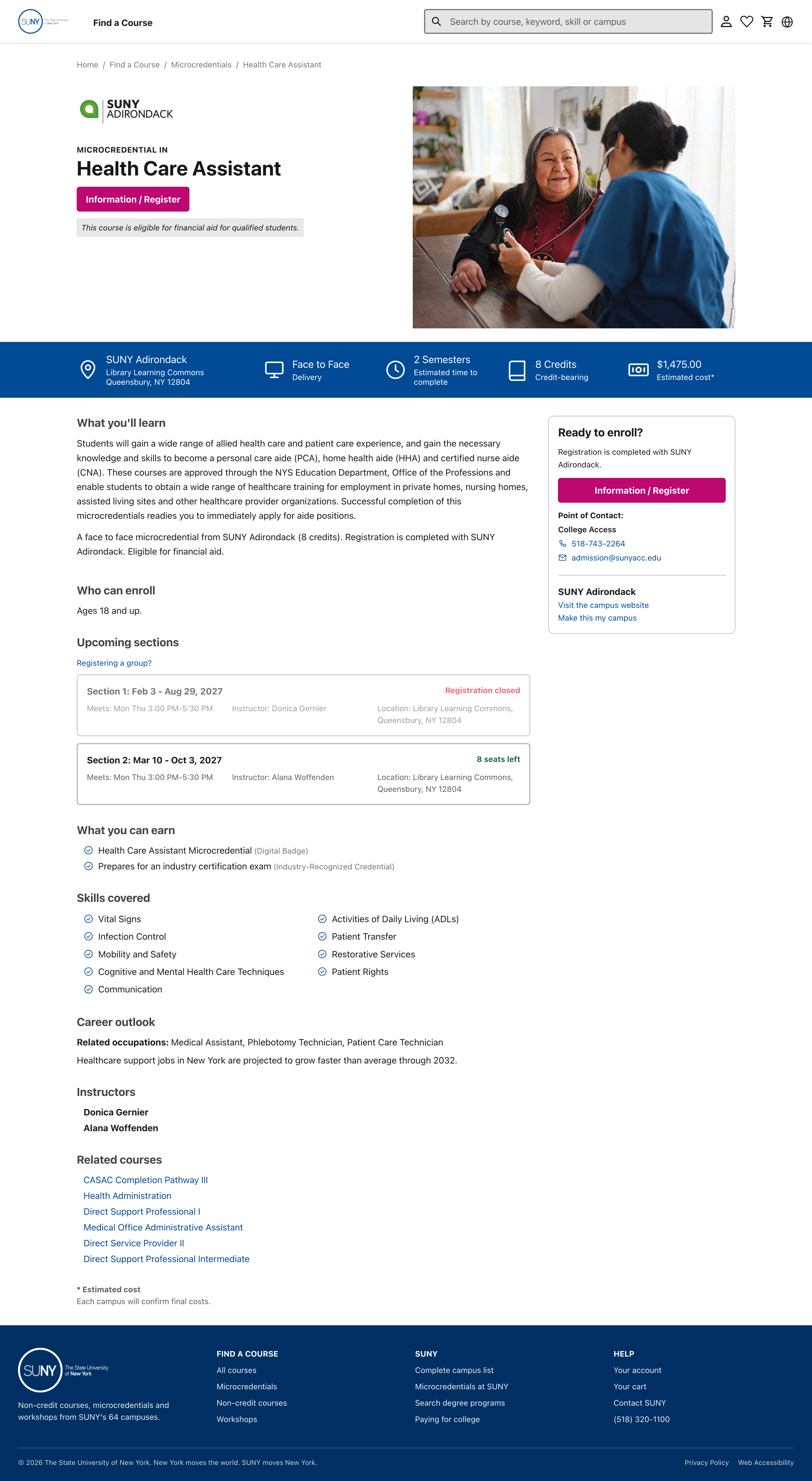
Consequence: the closed-state information falls below the normal-text 4.5:1 threshold. N-001/N-004. Change: keep availability messages readable when a class is unavailable. Dim an inactive action separately if needed. Confidence: verified for this displayed text and background. Check: verify the revised composited color and check other unavailable states. The earlier JPEG estimate was screening only; this live measurement supersedes it. The contrast criterion supplies the threshold.
F-028: Keep the catalog and course pages inside a narrow screen
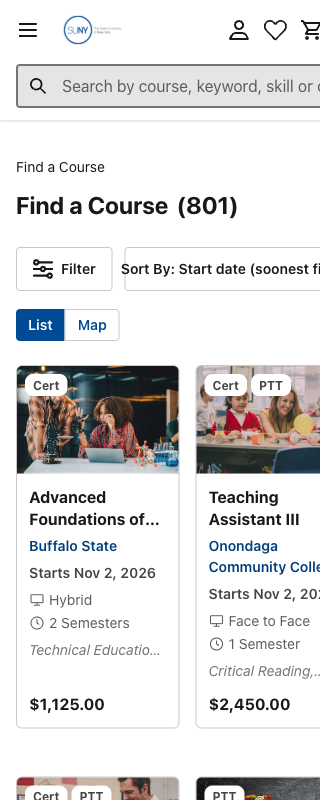
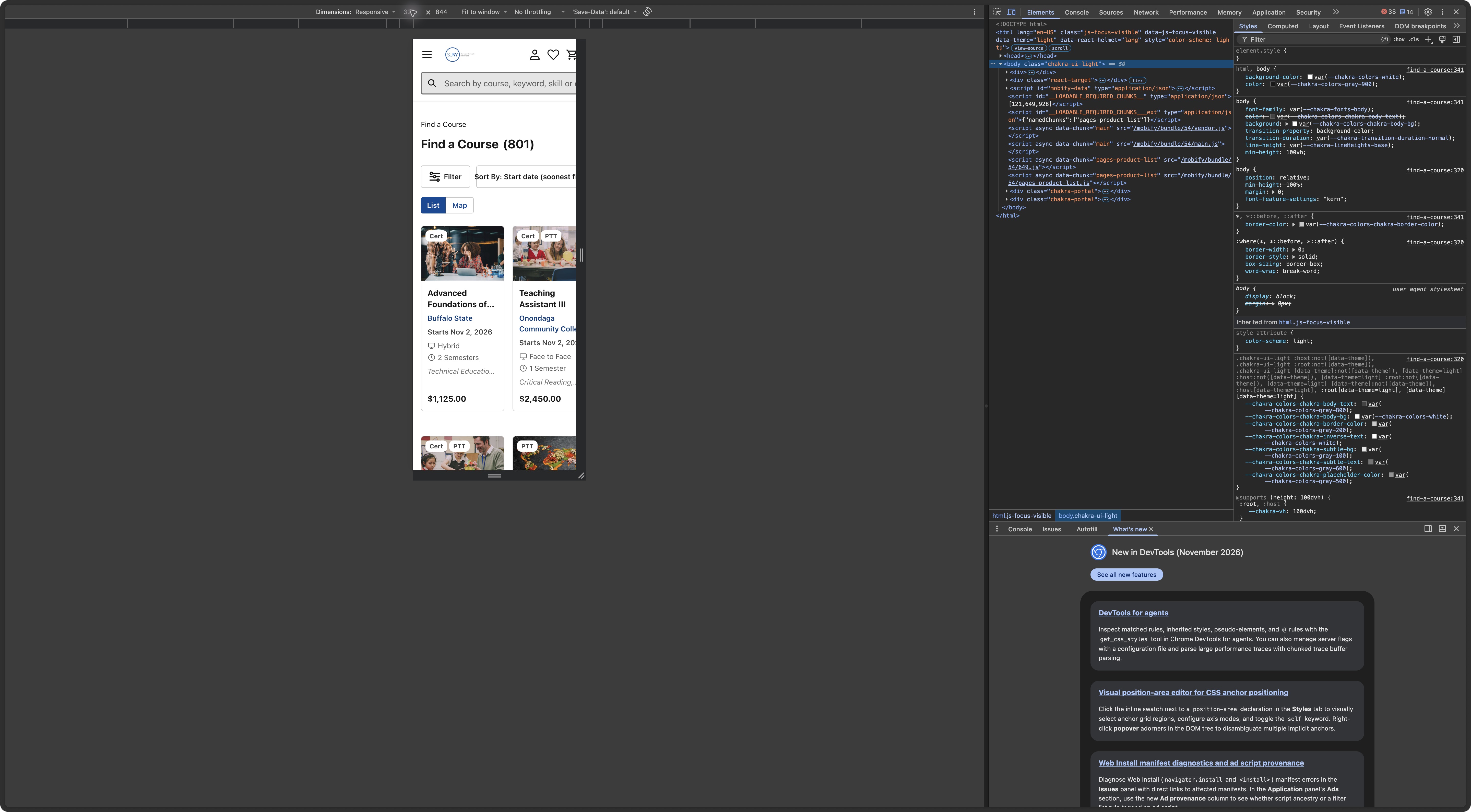
Observed, E-044: on a small phone, the catalog cuts off the right side of its header, sort control and second course card. The issue remained after a fresh reload in Arc and appeared in Chromium too. Both checks used a verified 320 CSS-pixel viewport. In Chromium, the page measured 377 pixels wide inside that viewport. Chromium viewport, E-061. Fresh-load screen; width and page state.
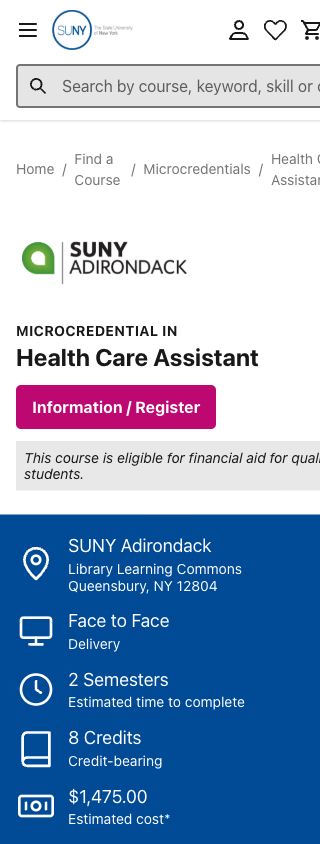
Further check, E-063: the same clipping appears on Health Care Assistant and the workshop at the small phone width. Each page measures 375 pixels wide inside a 320-pixel viewport and clips header content. Both fit the wider 390-pixel viewport. Course capture; measurements.
Homepage check, E-065: the homepage also cuts off the right side of its opening content on a small phone. It measures 375 pixels wide inside the checked 320-pixel viewport, but fits the sampled 390-pixel viewport. Narrow homepage; widths.

Consequence: a phone user cannot see the full comparison and controls within the screen width. N-001 and N-004; all public discovery scenarios. Change: let header controls wrap and use result cards that fit the available width, with a single column where needed. PruTech's design/development owner should check the page's minimum widths. W3C's reflow criterion supplies a relevant 320-pixel check; this sample does not establish whole-service conformance. Confidence: high for the observed preview, physical-phone testing pending. Check: repeat search, filters, sorting and opening/returning from details at 320 and 390 pixels, with complete controls and readable facts inside the width.
F-029: Explain what hybrid attendance involves
Observed: Clinical Patient Care at Broome shows Hybrid, two weekly meeting times and a campus location, without explaining the split between online and in-person study in the checked page. A later full-page check of Buffalo State's Advanced Foundations microcredential also showed Hybrid and Tuesday/Thursday meetings at its Workforce Training Center, with no online/in-person split in the page text. Broome detail; Buffalo State detail; fresh browser check.
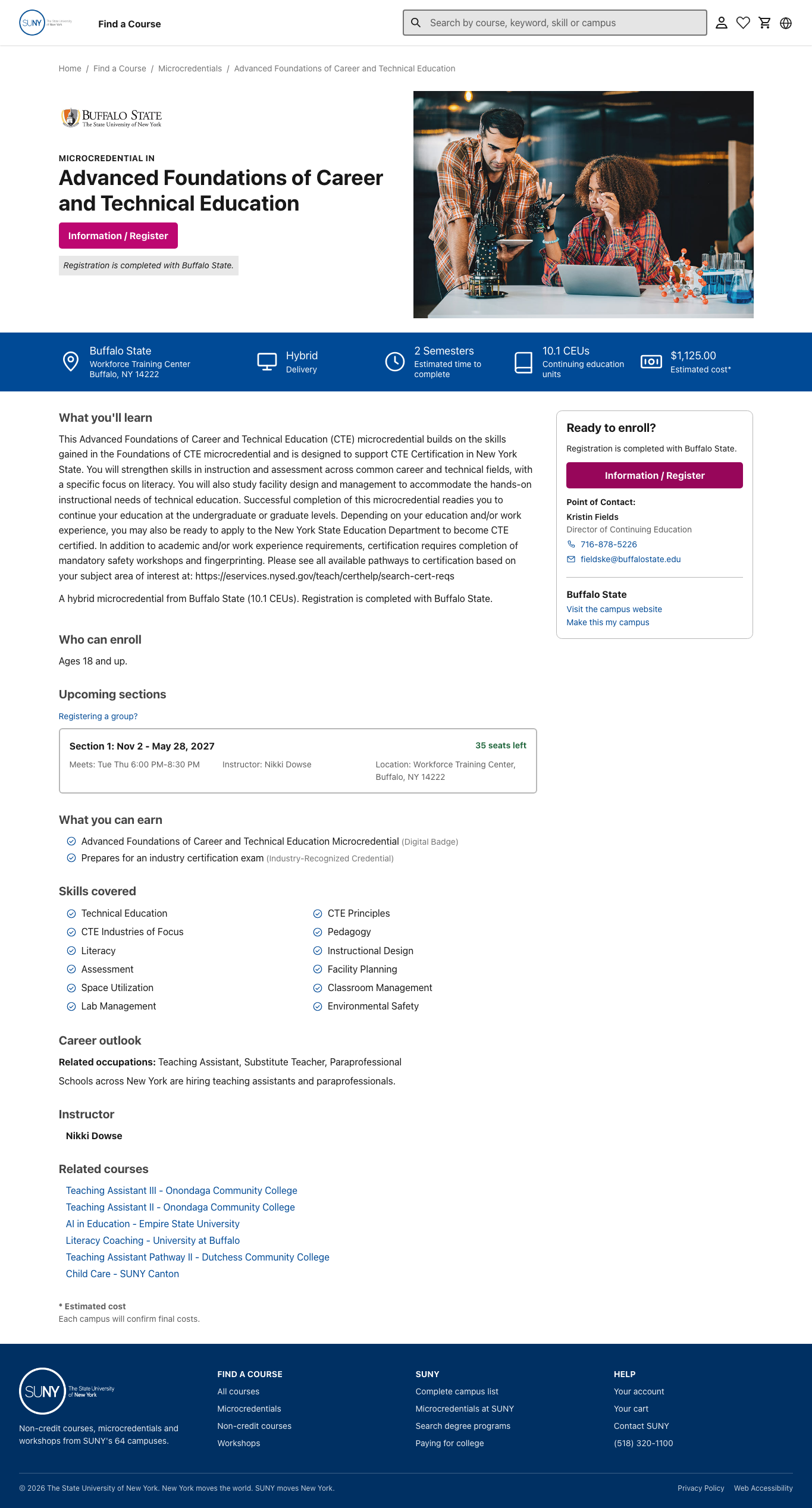
Consequence: someone comparing training around work or travel cannot fully judge attendance, N-001. Research F-017 and NN/g's online-program guidance support checking the actual study experience. Change: the campus content owner should state which meetings require travel, which happen online and any study outside set meetings. Confidence: strong for the observed information gap, effect untested. Check: a learner can explain the required travel and weekly commitment.
F-030: Put useful attendance facts in the comparison
Observed: patient-care and Spanish result cards show start date, delivery and semester length. Recurring meeting times and instruction hours become available in details. The two Spanish examples list 25 and 50 hours despite the same semester label. Search E-045; search E-049; comparison.
Consequence: a person must open each option to check key attendance differences, N-001. Change: test a compact result layout showing relevant meeting days/times and teaching hours when known. This does not require a new comparison tool. Design and campus data owners should agree fields and missing-value treatment. Confidence: strong observation, proposed layout untested. Check: people can identify or rule out options against realistic attendance constraints, with research on practical fit as the rationale.
F-031: Help personal-interest learners judge level and value
Observed: the checked Spanish pages describe everyday conversation for travel, work and community. They do not explain prior knowledge needed or specific conversational abilities on completion. E-048 details; screen.
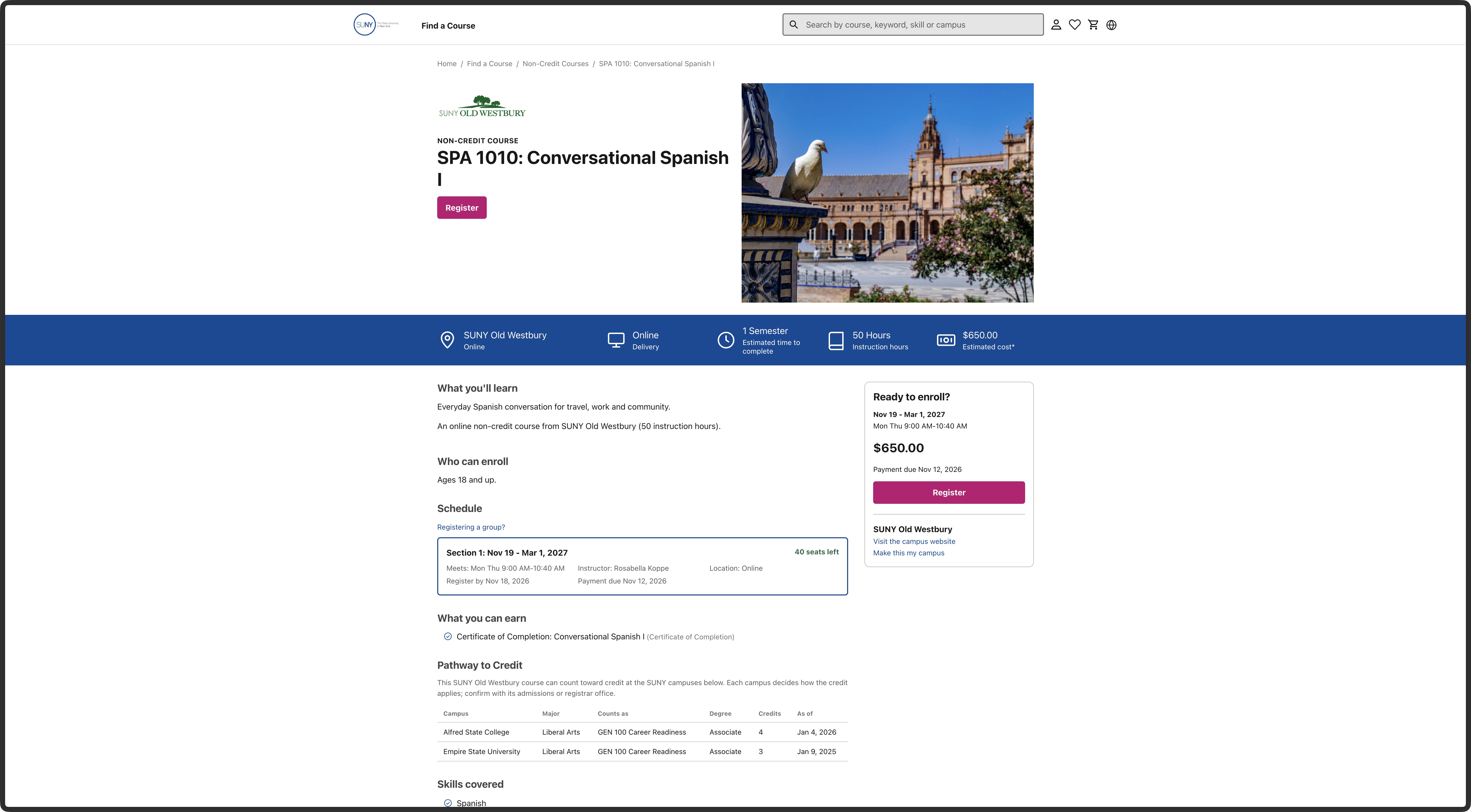
Consequence: a person choosing for travel cannot confidently judge the starting level and learning value, N-003. Change: the campus content owner should state the starting knowledge and a few concrete learning outcomes. Preserve the personal-value framing supported by research F-016. Confidence: strong for the limited description, learner interpretation untested. Check: a prospective learner can explain whether the level fits and what they expect to be able to do.
F-032: Keep a course-specific question route close to registration
Observed: Broome and Adirondack show campus phone/email beside the action. In the checked workshop and Spanish details, the observed alternatives are campus website links and general SUNY contact links; a course-specific question action was not found. Healthcare E-047; Spanish E-048; workshop.
Consequence: someone unsure about suitability or costs has a less direct way to ask the responsible campus, N-005. Change: the support/campus owner should confirm an approved contact or inquiry route that preserves course and section context, asks only for needed fields, names who will answer, and works without an account. May 22 also narrowed tuition-reimbursement wording to the responsible campus. Form fields, acknowledgement and response routing were not tested. S03 story 37; May 22, 9:02–12:35. Confidence: bounded observation; channel and response rules need an owner. Check: a person can reach the right help without starting registration or creating an account; no inquiry need be submitted in an expert check.
F-041: Give people a starting point for their goal
Observed: the homepage offers search, three course-type links and 64 campus links. These help someone who knows a word, type or campus. The page does not offer a direct subject or goal route near its opening choices. The later heading “Which SUNY are you?” leads to Explore all courses. Full homepage; homepage text and links.
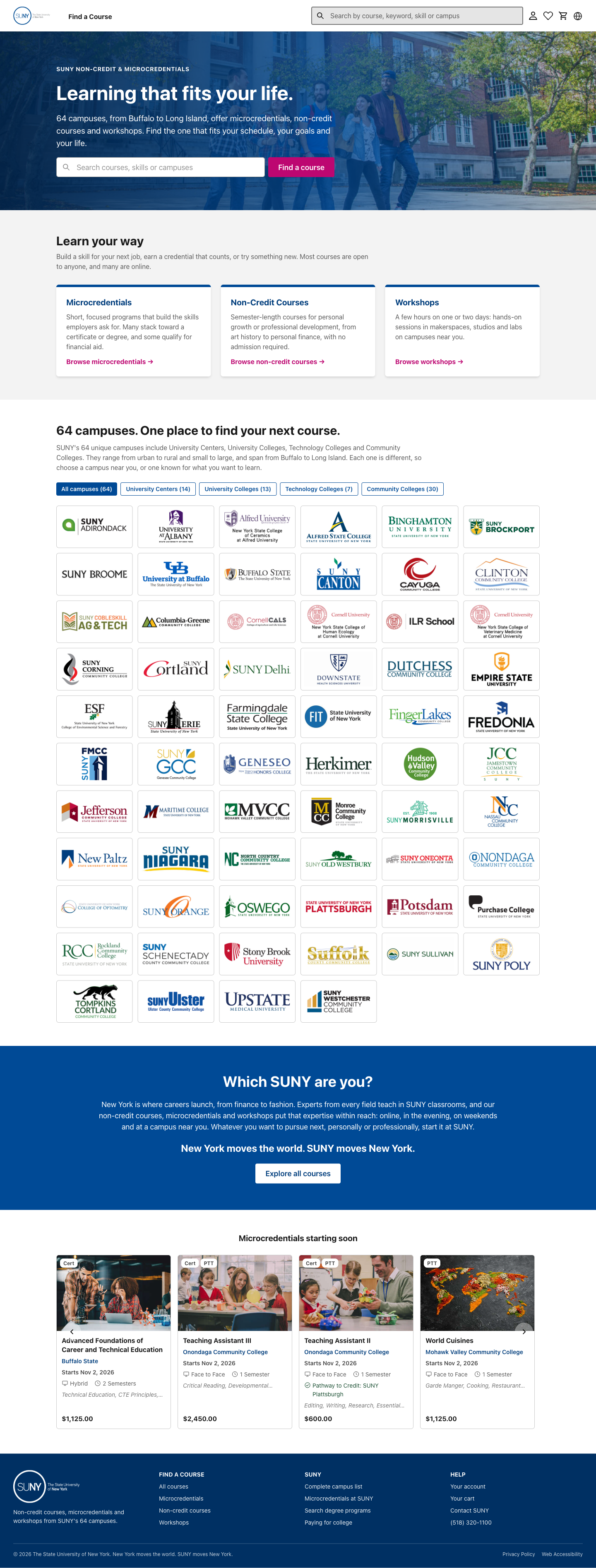
Consequence: someone who wants to explore a subject or change direction must know which label to choose or begin with a search term. This is an expert judgment, not an observed learner failure. N-003–004; the Rutgers noncredit studies show varied learning goals, while the May review asked for public language. Change: test clear subject or goal starting points that lead into the existing catalog. Rename the later invitation so its destination is clear. Keep direct search and campus entry. Check: people with different goals can choose a useful first step without being assigned a fixed persona.
F-042: Check the homepage's course claims
Observed: the homepage describes non-credit courses as “semester-length” and says they need “no admission.” Its microcredential card says many stack toward a certificate or degree and some qualify for financial aid. These are qualified statements, but the page does not explain which offerings meet those conditions. Course-type cards; exact text.
Consequence: a person may carry a broad category statement into a specific decision. The glossary allows varied non-credit offerings and distinguishes credit, non-credit and pathway terms. Some offerings need a campus review before sign-up. That review may differ from degree admission, so the “no admission” phrase is a question to clarify, not a proven false claim. Glossary; journey handoff. Change: ask SUNY content and registration owners to define the conditions, then link category explanations to course-specific dates, entry rules, credit pathways and aid. Check: a learner can tell which statements apply to a chosen course.
F-043: Put the campus directory in proportion to course discovery
Observed: the homepage shows a full grid of campus logos before the course examples. Each logo is a route to that campus's catalog results. The known-campus route works and should stay. Full homepage; campus-link check.
Consequence: the largest middle section serves people who know a campus, while people starting with a subject or practical goal get less guidance. This is a hierarchy judgment, not measured attention. N-003–004. Change: keep the campus route easy to find and test a shorter directory entry beside course or subject paths. Check: a known-campus visitor can still get there quickly and an exploring visitor can reach relevant offerings.
F-044: Show the range of learning the homepage promises
Observed: the opening copy welcomes work goals and personal interests and links to courses, workshops and microcredentials. The visible featured shelf is “Microcredentials starting soon.” Some examples may appeal beyond work, but the other two offering types have no comparable example shelf. Full homepage; text.
Consequence: an exploring visitor sees a narrower sample than the opening promise. N-003. Change: test a small set of real, current examples across goals and offering types, with clear dates and campus ownership. Do not imply that these examples represent the full catalog or that a credential is right for everyone. Check: people can recognize at least one relevant path and understand that the examples are only a starting point.
F-045: Offer help where people start choosing
Observed: the homepage footer has Contact SUNY and a phone number. Near the opening search and course-type choices, there is no visible help path for someone unsure what to search for or which type fits. Full homepage; footer links.
Consequence: a person with an unanswered question has to reach a general footer contact before knowing who can advise on a course. N-005. Change: place an approved general help route near the first choices, and name who receives questions. The draft requirements support questions before registration. SUNY and PruTech should confirm routing and response expectations. Check: a visitor can find a way to ask without choosing a course or creating an account.
F-046: Show entry conditions before the next step
Observed: the checked Buffalo State microcredential says “Ages 18 and up” under Who can enroll. Its longer description separately lists education/work experience, safety workshops and fingerprinting for a possible later state certification. Those are certification conditions; the page does not say they are admission requirements for this microcredential. Full detail; fresh browser check.
Consequence: a person may need to distinguish course entry from conditions for a later credential or job. The draft requirements call for age checks, other prerequisites and a clear unable-to-verify state when birth date is absent. They leave campus approval and exceptions open. S03 stories 8 and 13; S10 catalog rules. N-003–004. Change: the campus owner should confirm and label any true entry requirements, documents or approval steps before the action. Keep separate certification conditions where they belong. Confidence: high for displayed content; missing entry rules have not been established. Check: a learner can tell whether they may join now and which later conditions apply.
F-047: Give unavailable classes a next step
Observed: Health Care Assistant shows one closed section and another with seats. The closed message needs the contrast fix in F-027, but readable status alone does not explain every unavailable route. No full, waitlist or Coming Soon interaction was reached in this review. Checked page; availability rules, S03 story 11.
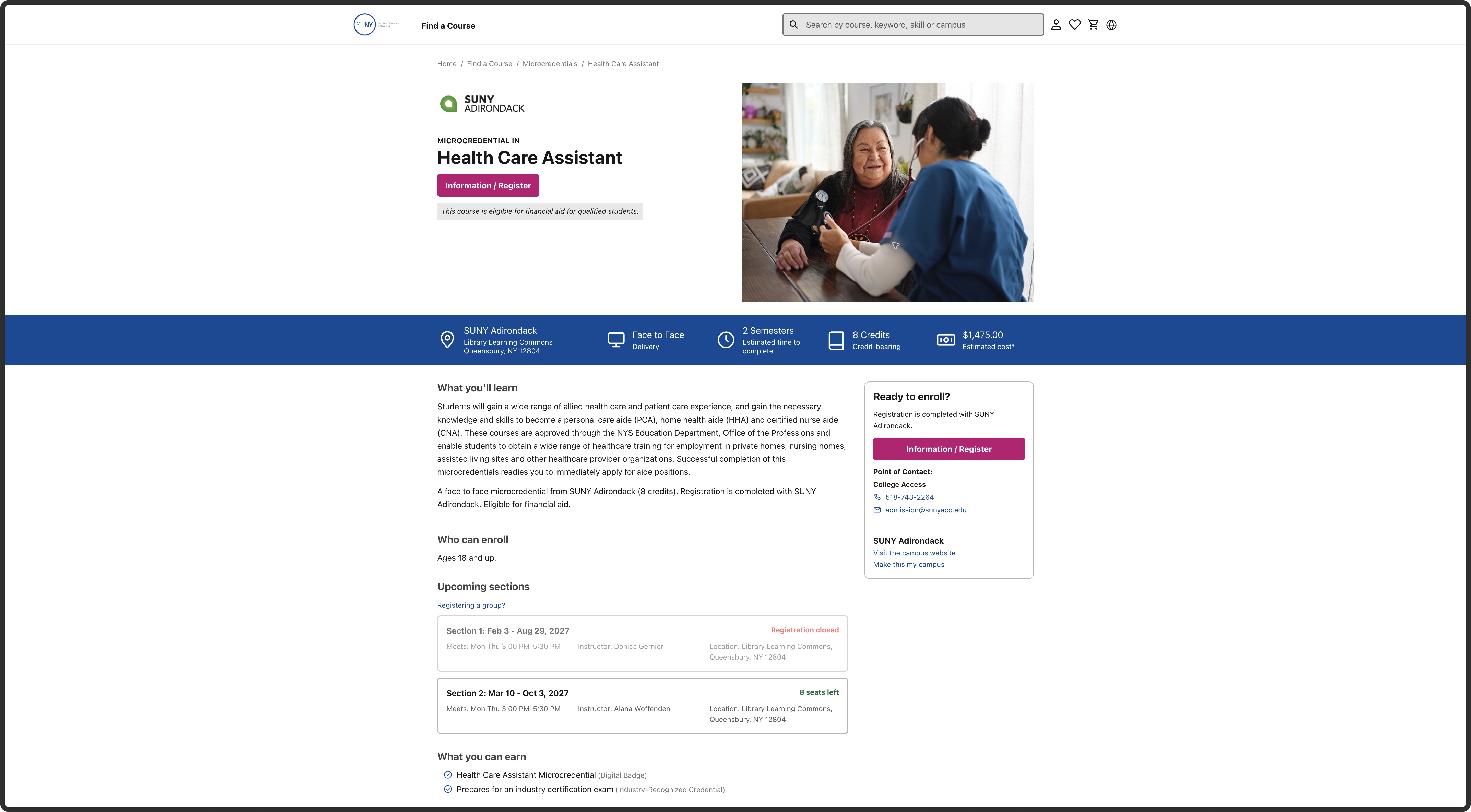
Consequence: a person who cannot take the open section needs to know whether to pick another date, join a waitlist, request an alert or ask the campus. N-001/N-005. Change: keep the available alternative visible; define a clear, truthful next step for each approved closed, full and Coming Soon state. SUNY/PruTech must settle when each state is public and what an alert or waitlist commits to. Confidence: observed for the closed/open pair; other states remain untested. Check: inspect real examples of each state before prescribing its exact action.
F-048: Make campus and nearby choices clear
Observed: saving SUNY Adirondack put its courses first while the displayed result count stayed 801 and other campuses remained below. The page has a separate “Only SUNY Adirondack courses” choice. When device location was declined in an isolated browser, an alert invited ZIP entry. These are useful distinctions. Saved-campus screen; browser check.
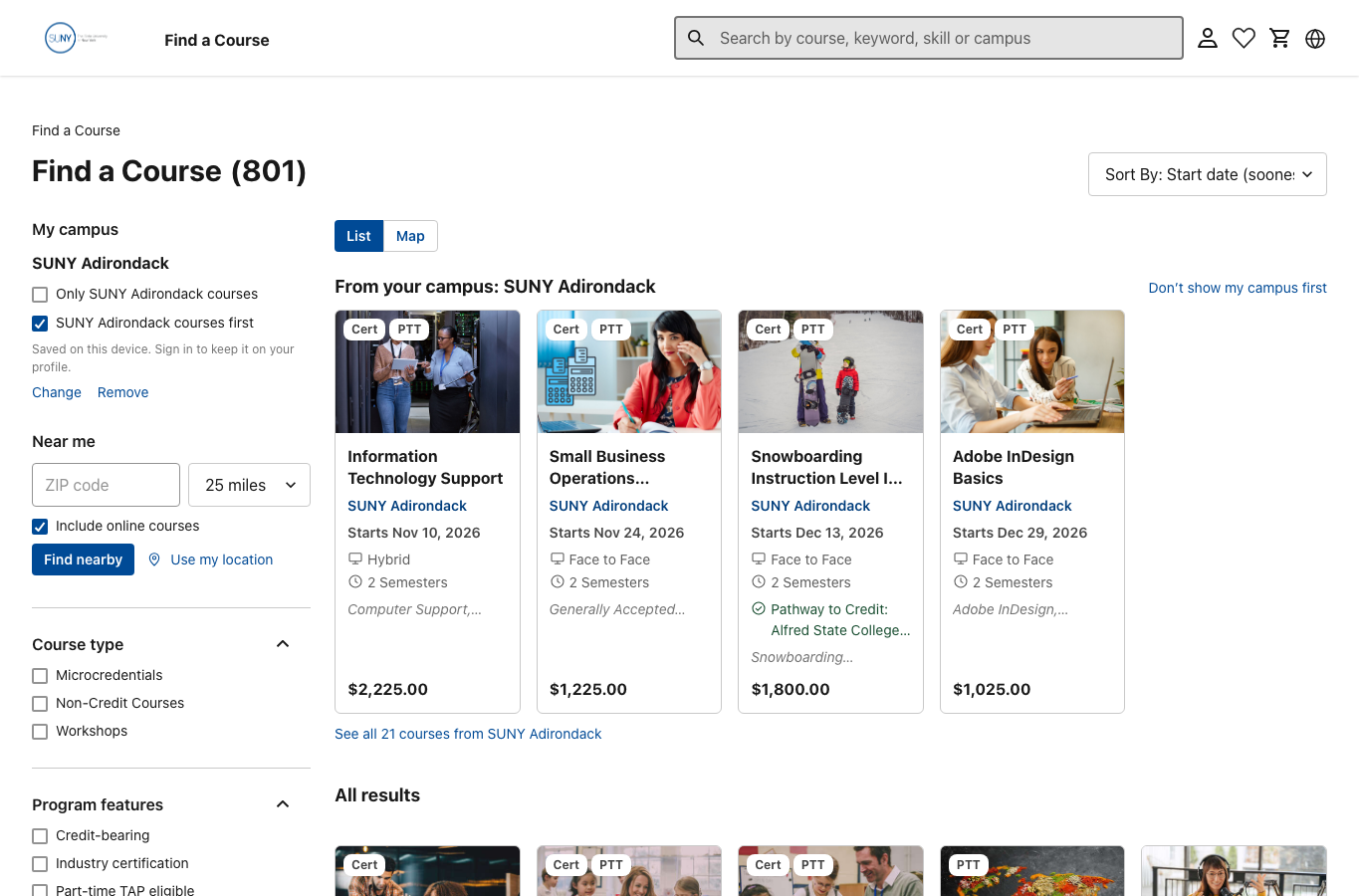
Consequence: someone comparing travel and online options needs to know whether a choice ranks or removes courses, and what address a distance uses. N-001/N-004. Change: preserve the visible ranking/filter distinction and declined-location fallback. Confirm whether distance refers to the teaching site or main campus, how online or multi-site offerings appear, and whether manual ZIP search works. S03 stories 4–5 and S10 differ on whether a preferred campus may hide other results; the current prototype's ranking behavior should not settle policy by itself. Story rules. Confidence: high for sampled ranking and denied-location response; actual distance results and release rule are open. Check: compare a real address search, declined permission and preferred-campus return without hiding relevant alternatives.
F-049: Explain the sponsored learner's own next step
Observed: the workshop says an employer decides tuition-assistance eligibility and tells employees to ask before registering. That helps, but this public page does not establish an invitation, employer link, amount the learner owes or whether they should use the normal Register action. Workshop funding section; text.
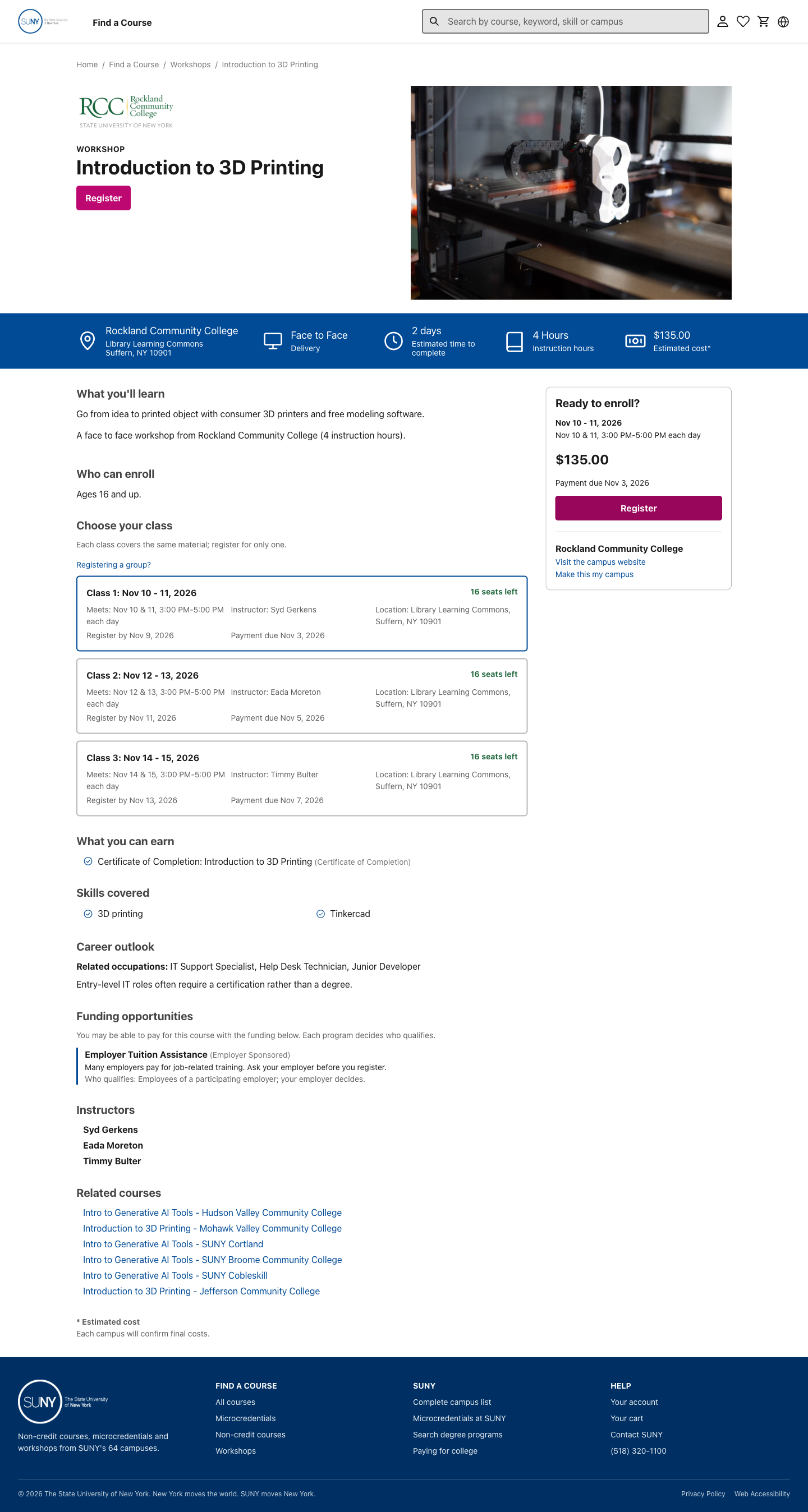
Consequence: a referred learner may not be the chooser or payer, yet still needs to check the right course, worksite, schedule, entry conditions and personal action. N-001–004/N-006. The draft requirements describe an employer cohort choice and later employer billing, with employee-to-employer linking unresolved. S10 employer rules. Change: agree when the public route is enough and when an authorized invitation changes the payer, eligibility and next step. Explain those conditions to the learner without exposing employer administration. Confidence: the funding copy is observed; the sponsored route was not entered. Check: walk a permitted referred-learner example with the responsible owner before treating this as a working journey.
F-050: Check language support across the whole choice
Observed: the language menu offered eight choices in the sampled public catalog. Choosing Español opened /es-US/category/find-a-course/, set the document language to es-US and translated the main heading. The skip link still read “Skip to Content.” The translated heading wraps, the sort choice and ZIP hint are cut short, and the first course title loses its ending after two lines. Other course, help and handoff states were not checked in Spanish. Spanish catalog; browser check; live layout measurements.
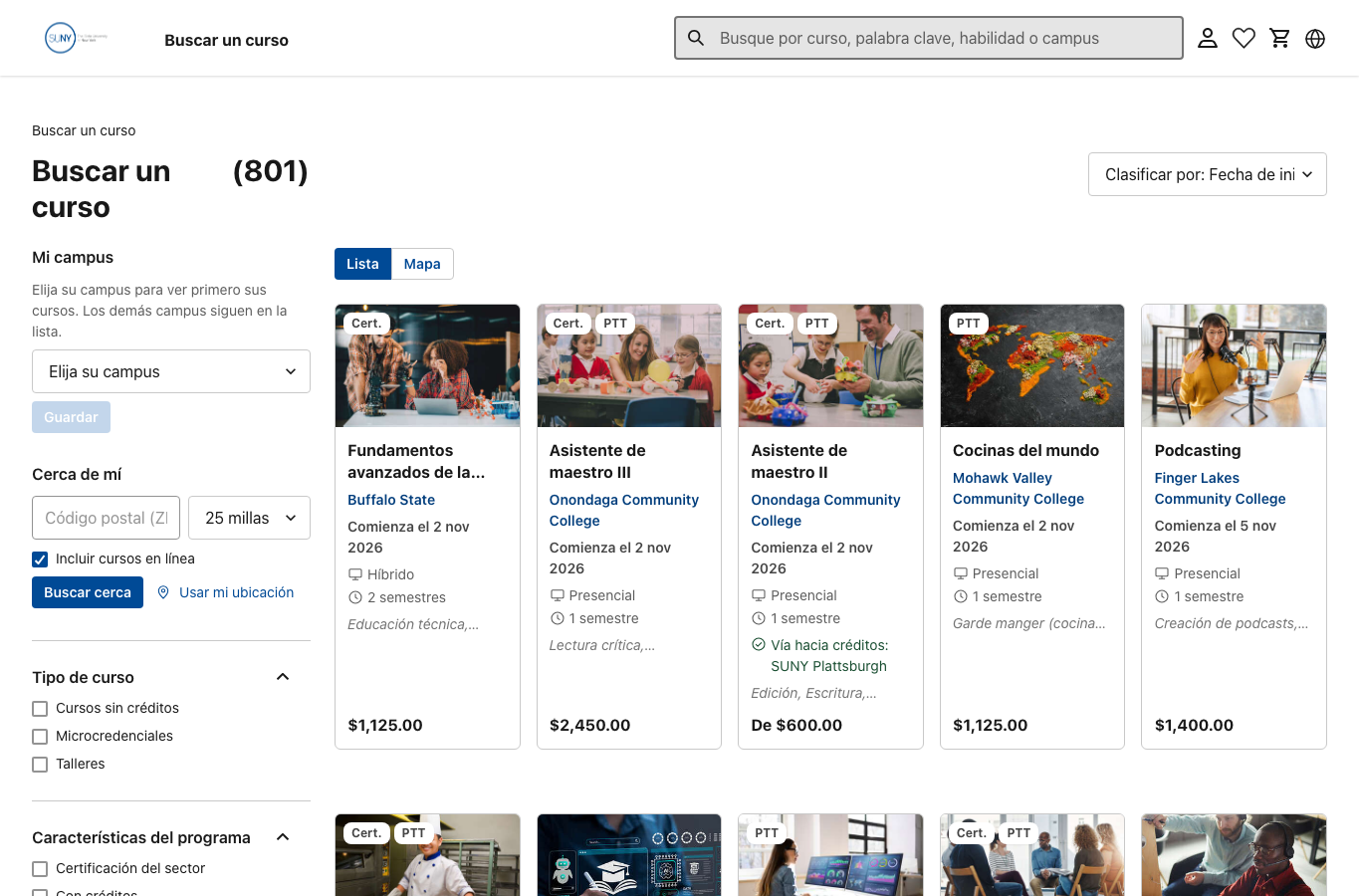
Consequence: someone using another language needs a consistent path through search, detail and the next step, including navigation and help. Cropped labels can hide the distinction between options. N-004/N-005. The RFP names English plus 12 state languages, while later prospective-visitor scope remains open. RFP language requirement; S10 language rules. Change: clarify which languages and public states are in scope for this release; translate shared navigation such as the skip link and allow longer words in headings, cards and controls. Confidence: high for the sampled catalog state only; no learner misunderstanding was observed. Check: complete a search-to-detail-to-help path in each agreed language, including keyboard labels and longer text at phone widths and enlarged text.
F-052: Agree the public navigation map before freezing the menu
Observed: the RFP and draft requirements name service areas, catalog records, search rules and access roles. PruTech's proposal includes site maps as a design deliverable. The team's current map was not among the materials reviewed here. In the prototype, the public header offers Find a Course, search and utility icons. The homepage adds course-type and campus routes; the footer links to account, cart and help. A course detail has a breadcrumb. The checked public path runs from home or a direct link through results, an offering and a class to the cart or a campus handoff. RFP scope and taxonomy; draft catalog and program rules; proposal page 110–114; checked public routes.
Why it matters: a person may arrive with a goal, a course name or a campus in mind. The wider navigation needs to support each start, help them find relevant options and give them a way back. Proposed solution: confirm the current site map and terms with PruTech and SUNY. If the team is still shaping them, sketch the public page types and routes together: search, course type, campus, course details, help, account entry, cart and campus handoff. Show entry, next, back and recovery paths. Then check whether people can find key destinations and understand the labels. Signed-in routes need their own owner check. Confidence: high about the checked public routes; the wider service and exact scroll restoration were not tested.
A course can be found by subject, campus, type or format. W3C guidance supports more than one way to locate pages. USWDS breadcrumb guidance distinguishes page hierarchy from steps in a transaction. Check: use a few realistic find-and-return tasks with relevant learners, then confirm the map, labels and ownership with SUNY.
Dedicated visual-design and accessibility pass
Three supplied screenshots broadened the visual check: homepage, E-050, course list, E-051 and Potsdam detail, E-052. Browser zoom and viewport size are unknown for those images. The findings below also use later live checks and design/access guidance.
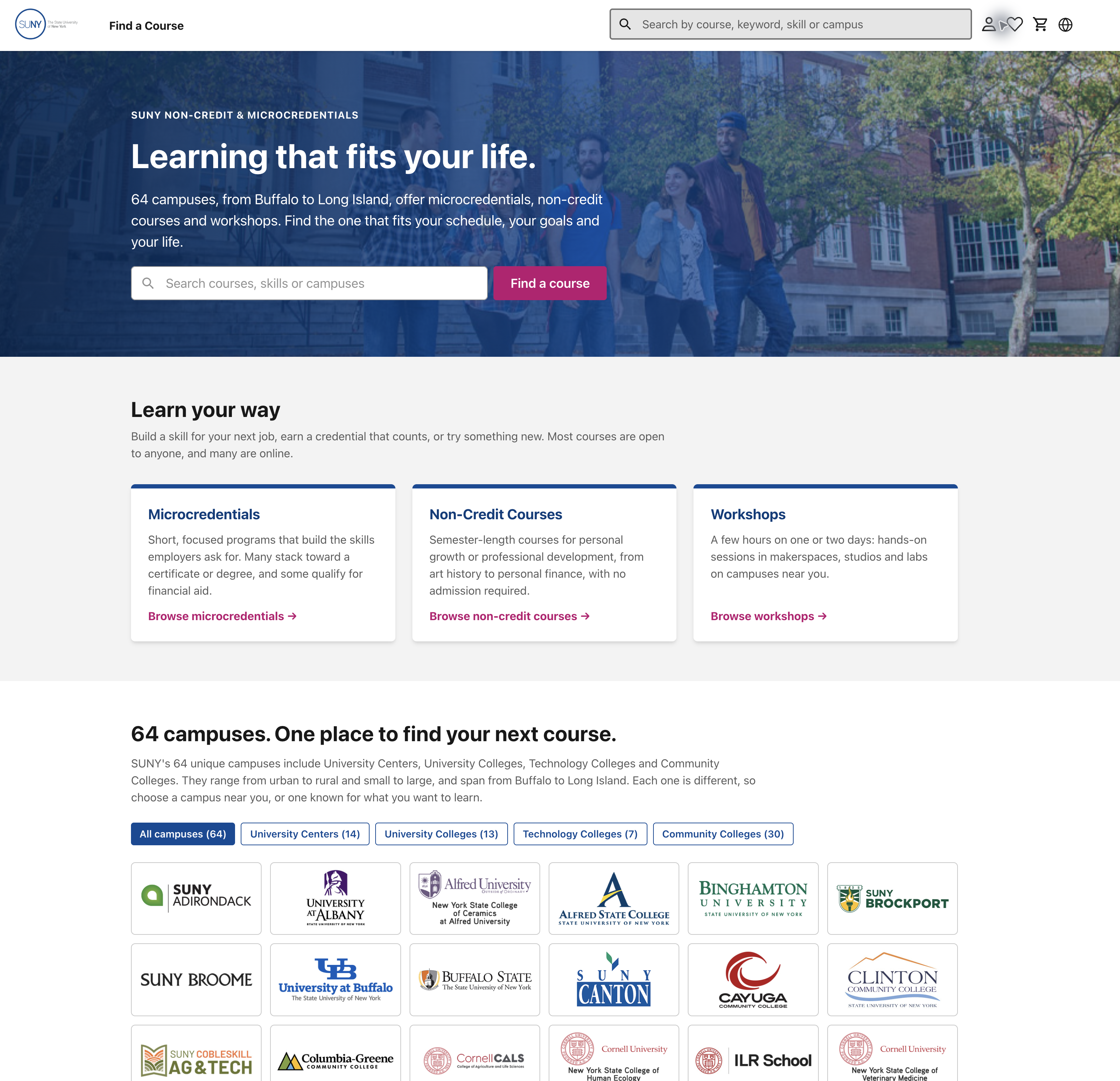
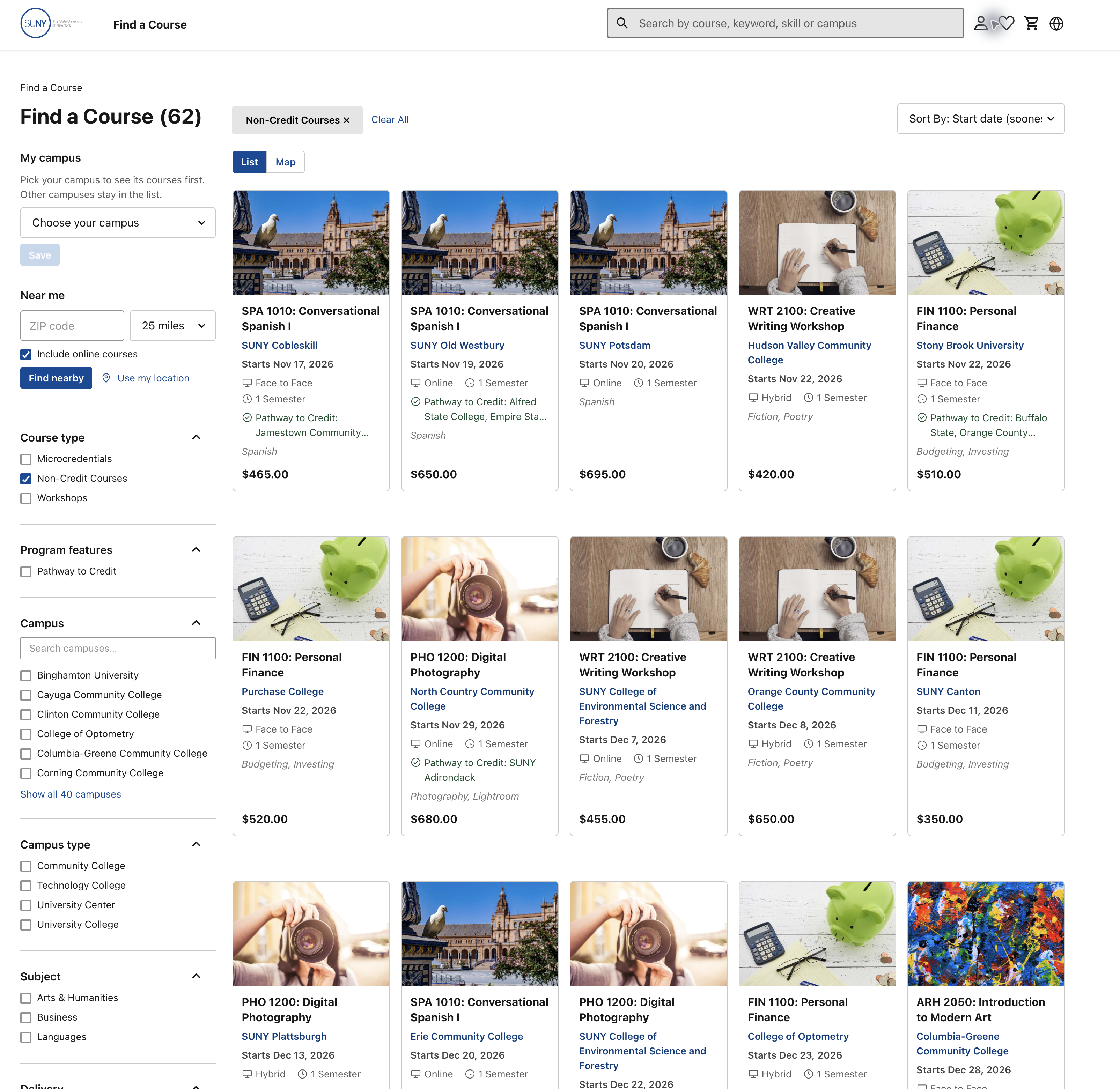
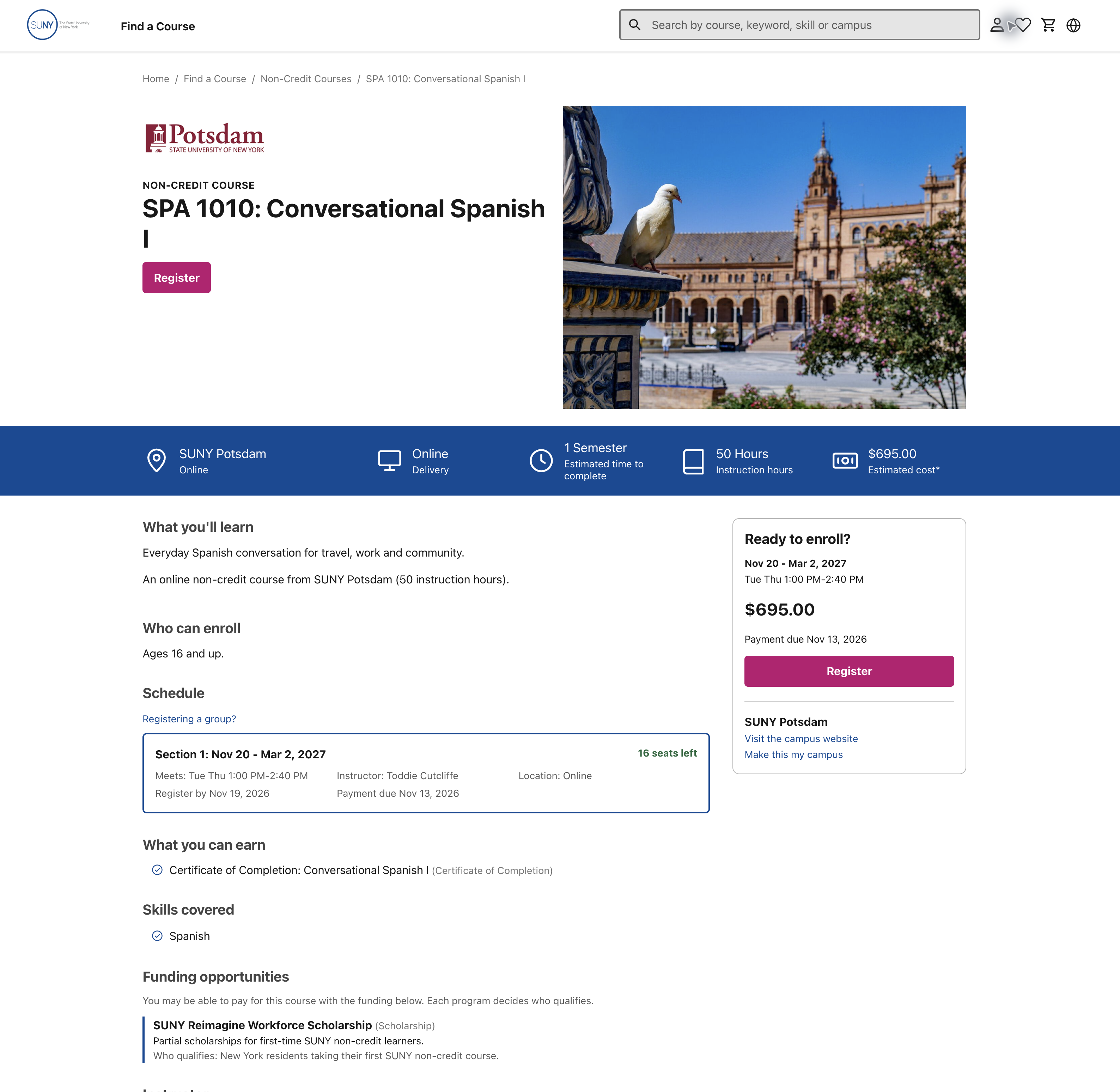
The live type and layout check, E-066 adds computed styles at 1440 and 390 CSS pixels. It shows a useful 16-pixel main reading size and 1.6 line spacing on the sampled course pages. The issue is how space and emphasis are assigned: the homepage's 48-pixel promise and 36-pixel campus message outweigh its 20-pixel starting-soon heading; five narrow cards limit names to two lines; and some attendance and funding details use 14-pixel supporting text. These are design priorities to test against learner questions, not a claim that a particular font size violates WCAG or that attention was measured. Use the approved SUNY design system before fixing type tokens.
F-033: Give equivalent actions a consistent visual role
Observed: homepage Find a course and detail Register are filled magenta. Cart Proceed to Checkout is filled blue. Category browse links are magenta; several campus/return links are blue. Blue also marks selected campus/view controls and Find nearby. Homepage; list; detail; cart.
Consequence: the visual language for the main next step changes across the journey. Different roles can justify different treatments, but the supplied material does not establish a shared action/state rule. This is a consistency risk, not observed learner confusion. N-004. Proposed solution for PruTech/SUNY to decide: define primary action, supporting action, link, selected and focus treatments in shared tokens and reusable component variants. Apply the agreed rule from search through checkout; do not choose a final pink or blue action color from this review alone. Check approved brand guidance and contrast in each state. Confidence: strong for observed styles; effect untested. Check: compare controls by role across pages and ask people to identify the next action.
F-034: Give decision facts more prominence than decorative imagery
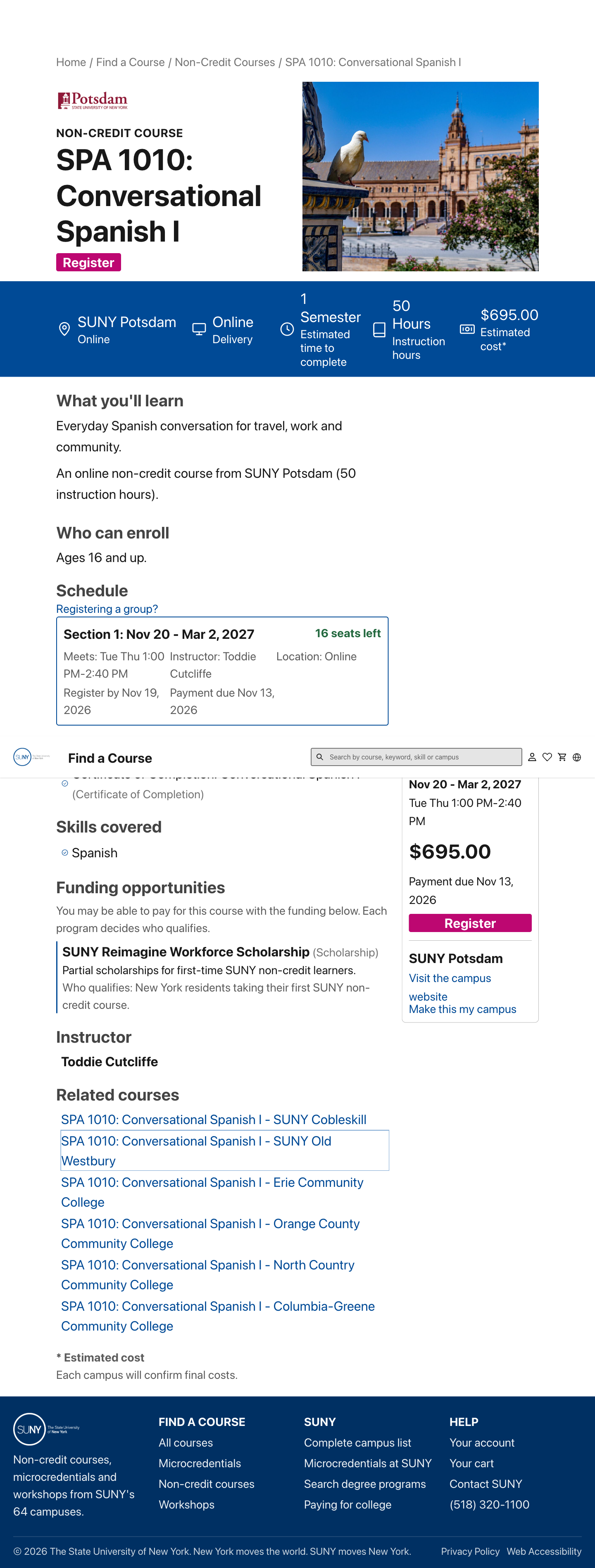
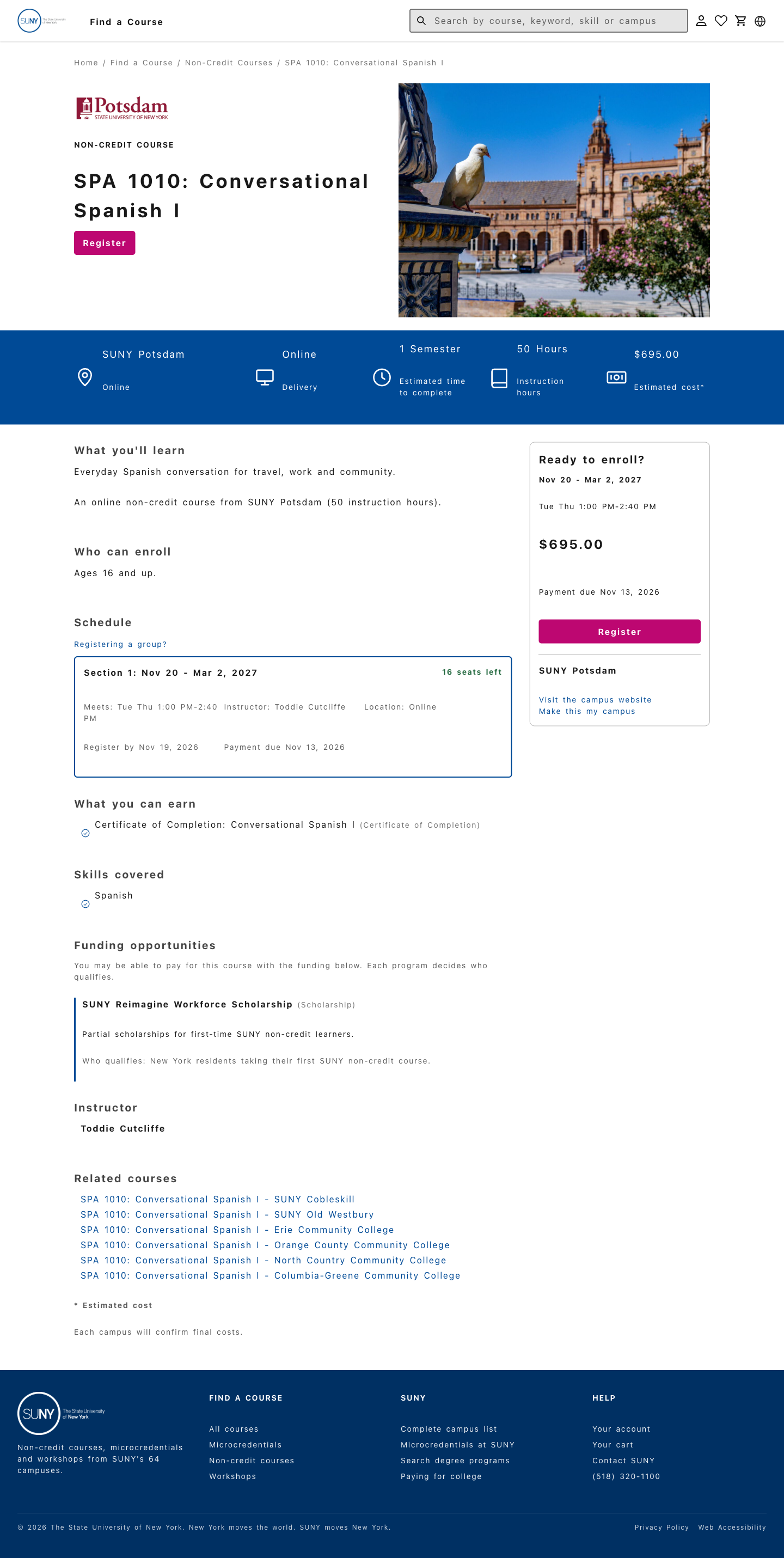
Observed: the Potsdam detail uses a large city photograph and spacious header before the attendance/price strip and learning description. The description itself gives little detail. Large course thumbnails also repeat across the list. On the homepage, the campus message uses 36-pixel type while “Microcredentials starting soon” uses 20-pixel type, although actual offerings are a closer step toward choosing. Detail E-052; list E-051; live hierarchy E-066.
Consequence: a learner must move past prominent imagery to assess learning and attendance. N-001–003. This is a hierarchy judgment; no attention or scrolling behavior was measured. Change: test a smaller image/header and bring useful outcomes, entry conditions and meeting facts closer to the title. On the homepage, give actual course choices at least the visual weight of general campus messaging. Keep images that help identify the subject. Design/content owners should compare layouts with realistic text. Confidence: strong observation, proposed hierarchy untested. Check: people can locate the decision facts across widths and at enlarged text sizes.
F-035: Keep the course level with its title
Observed: Potsdam's heading wraps the final I onto a separate line, despite substantial room occupied by the adjacent photograph and header. E-052 detail.
Consequence: the title is harder to scan as a meaningful unit, especially when comparing levels. N-003. Change: adjust the title area and type scale so Spanish I stays together across realistic widths. Do not shrink the whole interface to fix a single heading. Design/development owners should test long titles and text enlargement. Confidence: high for the wrap, readability effect an expert judgment. Check: complete titles remain readable without isolated level markers or clipped text. This is not, by itself, a WCAG failure.
F-036: Make course facts easier to scan in a consistent order
Observed: result cards use equal-height frames and bottom-aligned prices, which help comparison. At a 1440-pixel viewport, five cards sit in one row, with about 176 pixels for each first-card text line. The course name is limited to two lines and skills to one. A 390-pixel check still uses two cards per row, with about 145 pixels for the first title. Long campus names, delivery/duration wrapping and multi-campus credit-pathway text also create varying blocks. Repeated large images take space above the facts. The Spanish first card visibly ends “Fundamentos avanzados de la...” E-051 list; Spanish catalog; live card measurements E-066.
Consequence: a person comparing practical fit has to locate the same facts in differently shaped text blocks. A clipped name can hide the level or subject that distinguishes two courses. N-001–003. Change: preserve the useful price alignment; show the distinguishing course name in full, then give campus, attendance and cost a predictable order and emphasis. Use a brief pathway summary with access to detail. Test fewer or wider cards where longer text needs room, especially on phones and in translation. Design and data owners should agree missing/long-value treatment. Confidence: observed layout, comprehension effect untested. Check: compare short/long titles, campus names and translations without clipping or hiding needed facts.
F-037: Make meeting details easier to read and distinguish
Observed: the section card puts dates in bold, while meeting time, instructor, location and deadline details share smaller, muted text in compact rows. The sampled meeting line and group-registration link measure 14 pixels, while the main learning paragraph is 16 pixels with 1.6 line spacing. The funding introduction is also 14 pixels. E-052 detail; live type E-066.
Consequence: the attendance facts central to N-001 have limited emphasis among administrative details. Change: give meeting days/times a clear line and readable size/spacing; group location and deadlines by purpose. Design/development owners should verify actual type sizes, zoom and contrast. Confidence: visual judgment; no measured minimum-font violation. Check: learners can find the recurring meeting commitment at normal and enlarged sizes. May's tiny-footer comment is related feedback, not proof of a current schedule defect.
F-051: Make long course descriptions easier to read
Observed: Buffalo State puts course content, teaching approach, certification conditions and an outside link into one long paragraph. On desktop, its lines are wide enough to make those different points harder to separate. At the checked 1440-pixel viewport, the 16-pixel text has 1.6 line spacing and stretches across about 805 pixels, with roughly 93–111 characters per line. Course page; live line measurements E-066.
Consequence: someone checking what they will learn must sort several different decisions inside one dense block. N-001/N-003. This is an expert readability concern, not a measured reading failure. Change: keep the approved facts, but break the text into short, named answers for learning, attendance and later certification. Give longer reading text a narrower measure while keeping it responsive. USWDS typography guidance suggests about 45–90 characters per line for many reading tasks; it is a guide, not a SUNY rule. The campus content owner should check the wording. Confidence: high for the displayed layout, comprehension effect untested. Check: at phone width, desktop width and enlarged text, a learner can find the learning and certification answers without losing the complete source information.
F-038: Strengthen lighter field hints and keep labels visible
Observed: the search and ZIP code hints are faint against their white fields. Both use #939393 text and measure 3.07:1 contrast in the checked states. The search hint is 18 CSS pixels and the ZIP hint is 16 pixels, both regular weight. They fall below the 4.5:1 normal-text threshold in WCAG 1.4.3. The ZIP background was traced through its transparent ancestors to white. Live styles and method, E-061; homepage; catalog.
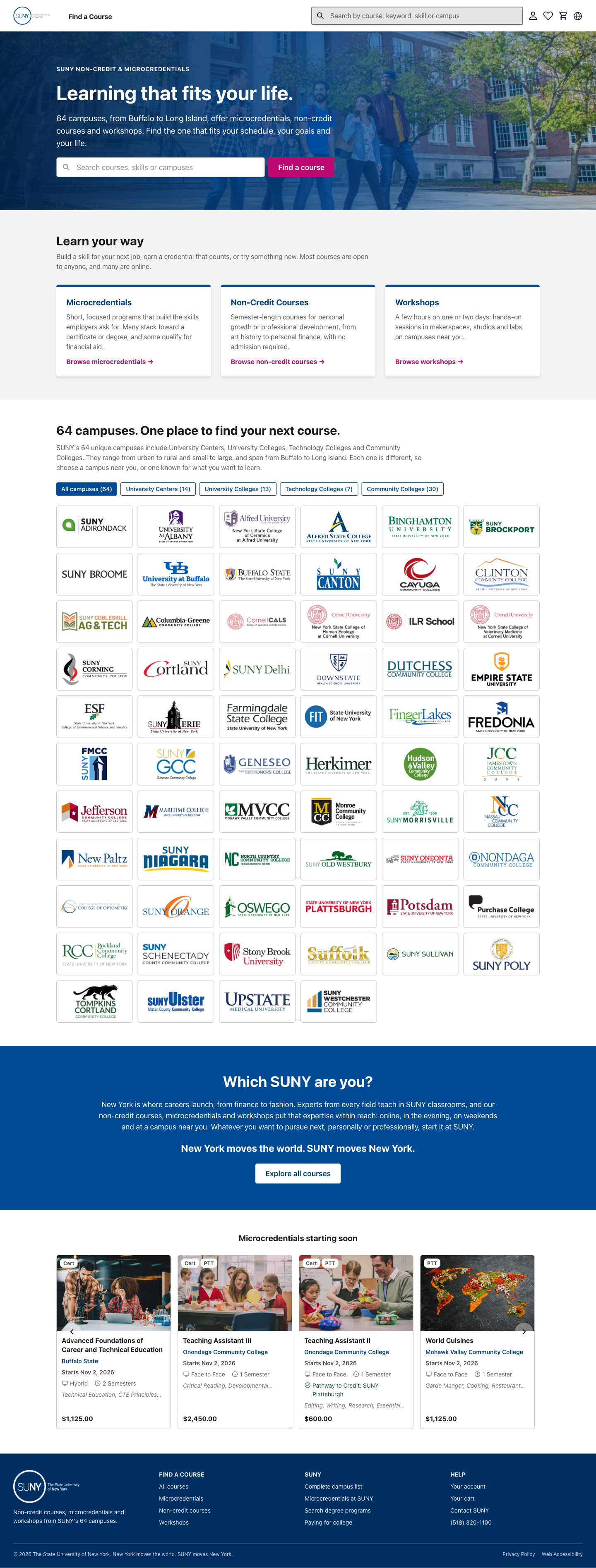
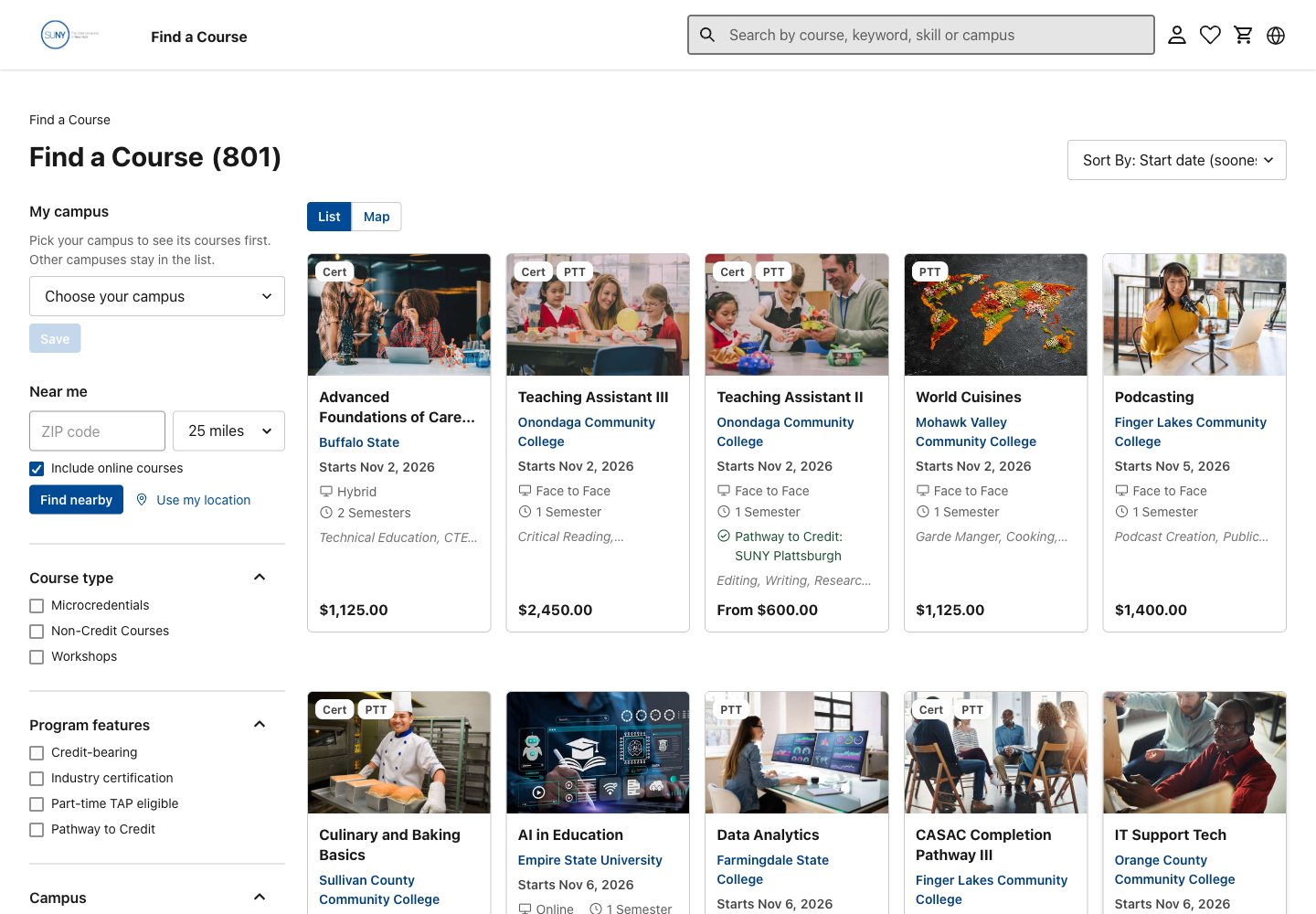
The earlier PNG screening, E-053 agrees with those colors. The darker introduction text on light gray is about 6.0:1, and header search text about 5.3:1. Those pairs are not demonstrated failures.
Consequence: people with reduced contrast sensitivity may struggle to read the search instructions. Placeholder instructions also disappear during entry. N-001/N-004. Change: strengthen the hint contrast and retain clear visible field labels. Confidence: confirmed contrast shortfall for these two enabled, normal-text states. Check: verify the revised colors and populated/focus/error states. The inactive Save control is excluded from this finding.
F-039: Show where the keyboard is
Observed: on the Potsdam course page, Tab reaches the top Register button, but the saved screen has no visible focus marker. Its focused outline and shadow are transparent. Registering a group has the same transparent focus styles. The class-selection control does show a browser outline, so this is not a claim about every control. Register focus, E-062; focus log, focus_and_contrast_followup.
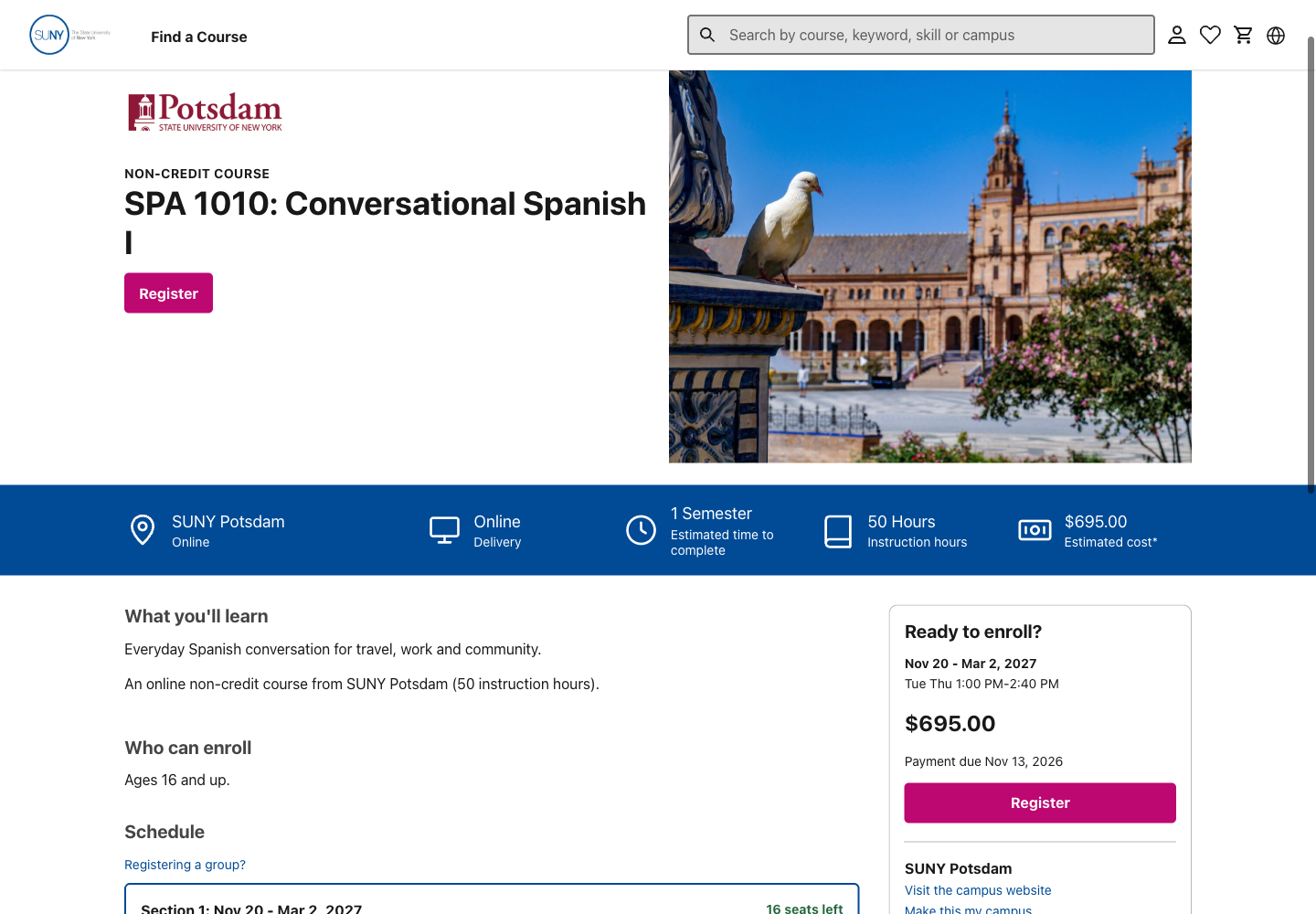
Consequence: a sighted keyboard user may not know which action will run. N-004. Change: give links and actions a clear, consistent keyboard-focus marker. Basis: WCAG 2.4.7. Confidence: observed in the sampled state. Check: Tab and Shift-Tab through results, details and handoffs with visible focus throughout.
F-040: Keep focused links below the fixed header
Observed: after someone uses Skip to Content, the next Home link sits behind the fixed header. The link is selected by the keyboard but cannot be seen. In the checked sequence, its box sits at y=16–61 beneath the header; a center-point check hits the header instead. Hidden Home link, E-062; geometry and key sequence.
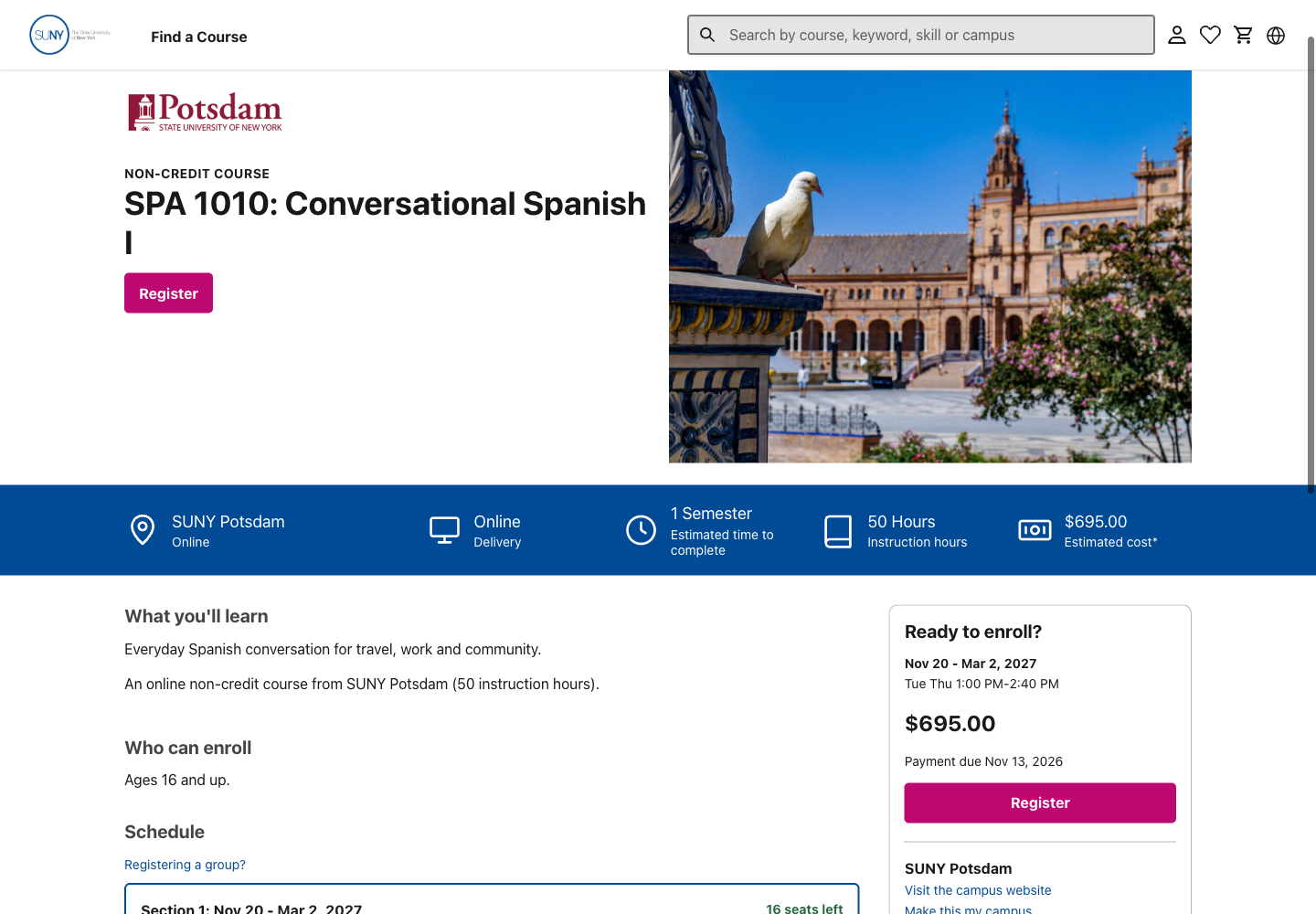
Consequence: a keyboard user can move to a link that is entirely hidden. N-004. Change: leave space below the fixed header when moving or scrolling to focus. Basis: WCAG 2.4.11. Confidence: observed in this sequence at 1440 × 1000. Check: repeat skip navigation and forward/backward keyboard movement at different widths and zoom levels.
What the wider access check has and has not established
| Area | Evidence/result so far | Remaining check |
|---|---|---|
| Text contrast | E-061 confirms hero/ZIP hint shortfalls. E-063 confirms the closed-status shortfall using its opacity chain | Other relevant populated/error/unavailable states and control boundaries |
| Control boundaries | Checkbox sample is about 3.1:1; campus-field border about 1.7:1 | Whether a boundary is needed to identify the control and actual focus/state colors. A low decorative border alone is not a failure |
| Meaning beyond color | Seats/closed states have wording; selected checkboxes have checkmarks | Programmatic selected state, other errors/statuses and any color-only information |
| Keyboard movement and names | E-063 confirms keyboard class selection, campus-modal tab containment and Escape focus return from campus/filter dialogs. Earlier skip/header samples retained | Remaining route variants, errors and complete handoff coverage |
| Visible focus | Logo outline in E-060; missing action focus and hidden breadcrumb in E-062, F-039–040 | All remaining controls, widths and states |
| Reflow | Catalog clips at 320 pixels; E-063 also finds 375-pixel width on two course pages at 320. Sampled course pages fit at 390 | Other detail variants, handoffs and physical-device/orientation coverage |
| Text enlargement and spacing | Temporary text/spacing samples retained. E-064 operates actual browser Page zoom at 200%, verifies a 720-pixel viewport and records course/catalog geometry | Complete content/control checks across all states. No whole-service resize or reflow pass is claimed |
| Targets and input | Controls inspected visually and named in native snapshots | Actual CSS hit areas/spacing, touch use and input/error instructions; screenshot pixels cannot establish target size |
| Reading order and assistive technology | Native names and some table/header structure are available | Screen-reader reading/order, headings, announcements, names/states and meaningful image alternatives |
| Review notes | Moving markers, keyboard and touch access, and a matching comment list | Check the interactive review at common screen sizes |
Later live checks used headed Chromium 148.0.7778.96, Playwright 1.60.0, an isolated anonymous context and a verified viewport. Course data and tracking consent were settled before saved captures. E-061/062 log.
The earlier browser-zoom shortcut did not change the measured viewport. Later E-064 uses the actual Page zoom setting at 200% in an isolated profile; it verifies 1440 to 720 CSS pixels and device ratio 1 to 2. That later check supersedes the earlier access block, without turning the text override into browser zoom. The separate doubled-text and spacing screenshots are limited user-style checks: text enlargement, spacing. Full-page captures can place fixed headers over content at the capture scroll position; use viewport captures for focus-obstruction findings. No screen reader or physical phone was used. These targeted checks do not establish overall accessibility conformance.
What SUNY previously said about readability
In the May 21 discussion at 41:40–43:15, PDF pages 31–33, Denise reported tiny footer text during the presentation. The discussion concerned showing the footer in the demo; it does not establish a current website font defect. Exact source note.
May 22 also begins with Denise reporting difficulty reading text in the shared presentation, 0:03–0:45, PDF page 1. This is a second meeting-view concern, not a measurement of the current site. May 22 source note.
No specific faded-color comment was located in the retained May feedback notes. The supplied RFP separately calls for readable size/contrast, keyboard/voice access and screen readers on PDF page 25. RFP requirement note. Use the client comment, written requirement and current observations as three distinct kinds of evidence.
Use May's feedback as a checklist
Sources: May 21, exact times and pages and May 22 follow-up. Later draft rules also matter.
| Earlier feedback | Current check and conclusion |
|---|---|
| PRI, NCSIM and “link farm,” May 21 25:32–27:30, 33:38–36:55 and 39:44–40:08 | These strings were not found in the retained public catalog/detail/cart states. Cert/PTT introduce a related plain-language concern, F-021. Inquiry and account screens remain unchecked. |
| Degree-related meal-plan copy, 36:57–39:41 | Not found in the checked public states; the learner dashboard was outside this review. The off-topic career section is a separate relevance concern, F-022. Credits and aid can be valid for a particular offering and need source checks. |
| Reasons and conditions for SSN/DOB, 5:30–18:48 | Identity forms were not entered. This remains unverified, not resolved. The discussion was conditional and demo-specific; the current FRD's field conflicts still need an owner decision. |
| Several courses in a cart, 20:15–25:08 | May left this open. Denise's example concerned two different classes for one person at one campus, which differs from quantity for a group. The current draft permits campus-grouped carts where policy/payment allow. One review item was added and removed. Multiple-course/campus behavior and seat holds were not tested. F-025–026 ask for the current rule. |
| Accepted May 22 corrections, 3:41–4:46 | The sampled catalog shows in-person delivery and result filtering, displayed amounts and start dates. Exact filter matching and the final payable amount were not checked across offerings. A semester label still appears on some result cards, but May objected to “Term” for a short example, not every semester course. These demo corrections should be checked against the current content, not assumed complete. |
| Course-context inquiry and campus-specific reimbursement, May 22 9:02–12:35 | The checked course pages have contacts, but no inquiry form was completed or followed. The Rockland funding section names employer tuition help, while campus-specific reimbursement wording and routing remain an owner check. F-032/F-049 separate the observed entry points from this untested path. |
| Tiny footer text, May 21 41:40–43:15; shared-text readability, May 22 0:03–0:45 | Both concern presentations. E-063 now measures live footer links/body at 14 pixels and legal links at 12 pixels, with light text on #003063. Size alone is not a WCAG failure. F-027 is the separate verified availability-text issue. |
| Clear steps, reference information and asking before registering | Preserve the named campus handoff, class-choice explanation and selected-class summary. Inquiry recovery needs a working destination, F-024. No confirmation/reference-number screen was reached. |
Keep what works
Search and course-type links give people a direct way into the catalog. The campus directory also helps someone who already knows where they want to study. Homepage check.
The catalog kept selected filters when a person returned from a course. The workshop explains that its classes cover the same material, and the date and payment summary changes with the selected class. The Potsdam funding section says each program decides who qualifies; Cobleskill's credit-pathway table names the receiving campus and dates. Keep those useful details near the choice they explain. Filter return; class choice; funding; credit pathway.

The campus handoff names the campus, says a new window will open and supplies contacts. Its keyboard focus stays inside the dialog, then returns to the button when the dialog closes. Handoff; keyboard check.
Coverage, corrections and next decisions
The review combines a native Arc walkthrough with later isolated Chromium checks. It covers public catalog/search, selected detail examples, class selection, cart and campus handoffs, empty-search help and the full homepage. Build/content version is unknown. The earlier Arc desktop images are capture pixels, not measured page widths. The narrow checks used browser viewports, not a physical phone.
Corrections: Health Care Assistant's full description is visible; only the accessibility snapshot was shortened. Filter and workshop-registration attempts through some native controls were inconclusive; later checks confirmed both work. Do not report these as defects. The first 320-pixel setup attempt failed; E-044 comes from a later verified width and reload.
No account, registration, payment or inquiry was completed. The earlier review cart was cleared. Later Chromium checks used a separate anonymous context and made no cart additions. Full keyboard coverage, screen-reader use, reflow beyond the sampled catalog, complete zoom/content checks, all unavailable states and learner testing remain open. Employers, guardians and signed-in roles have not been tested.
Before choosing a final design, PruTech can help identify which fields are test data, imported campus data or approved content, who owns corrections and how updates reach the catalog. This determines whether F-021–023 need data correction, clearer presentation, a product rule or a combination.
The recommended design direction focuses on results, course details and the next step: help a person judge attendance, cost and outcome, choose a class, and understand registration or inquiry. The design exploration, RD-001 records questions to check against the working product. Repository access would let PruTech and the reviewer connect these recommendations to the existing pages, components and course data before agreeing targeted fixes.
For learner validation, propose 3–5 people with relevant learning goals who have not seen the project, using short realistic tasks on their usual devices. Ask them to find a suitable class, explain cost/schedule/outcome, state what the next button does, and find help. Record unaided completion, misunderstandings and reasons; avoid leading prompts and real transactions. A small round can expose issues but cannot validate every persona or establish population rates. Recruitment, contact, incentives and any recording require an agreed arrangement first.
Review closeout and use
The review was checked against source notes, learner needs, saved screens and outside research. The six permission roles and 21 draft profiles remain separate from the four working situations. Outside studies supply context; observations of this prototype support its specific issues.
The clickable review is generated from this record and short screenshot comments. It uses the same shared tokens as the journey map. Each comment links to the full finding and readable source notes. Images preserve their original bytes. Positions were inspected against all saved targets; C26's initial placeholder position was corrected to the actual Contact Us target before delivery.
Owner questions remain: registration routes and release scope, data origin and correction ownership, cost and deadline rules, and support routing. The review and draft journey map can help the team settle these together.
The bounded expert review and feedback artifact can be shared locally while these questions remain open. Screen-reader output, physical phones, all unavailable states and learner testing remain unverified. Do not describe this as a complete accessibility audit or a validated improvement to learner outcomes.
The review interface has 54 comment and evidence pairs. Its earlier check covered keyboard opening and closing, focus return, dialog containment, phone and desktop layouts, reduced motion, links, and image or data failures. Interface-check log. Browser zoom was also sampled. These checks do not replace participant research.